
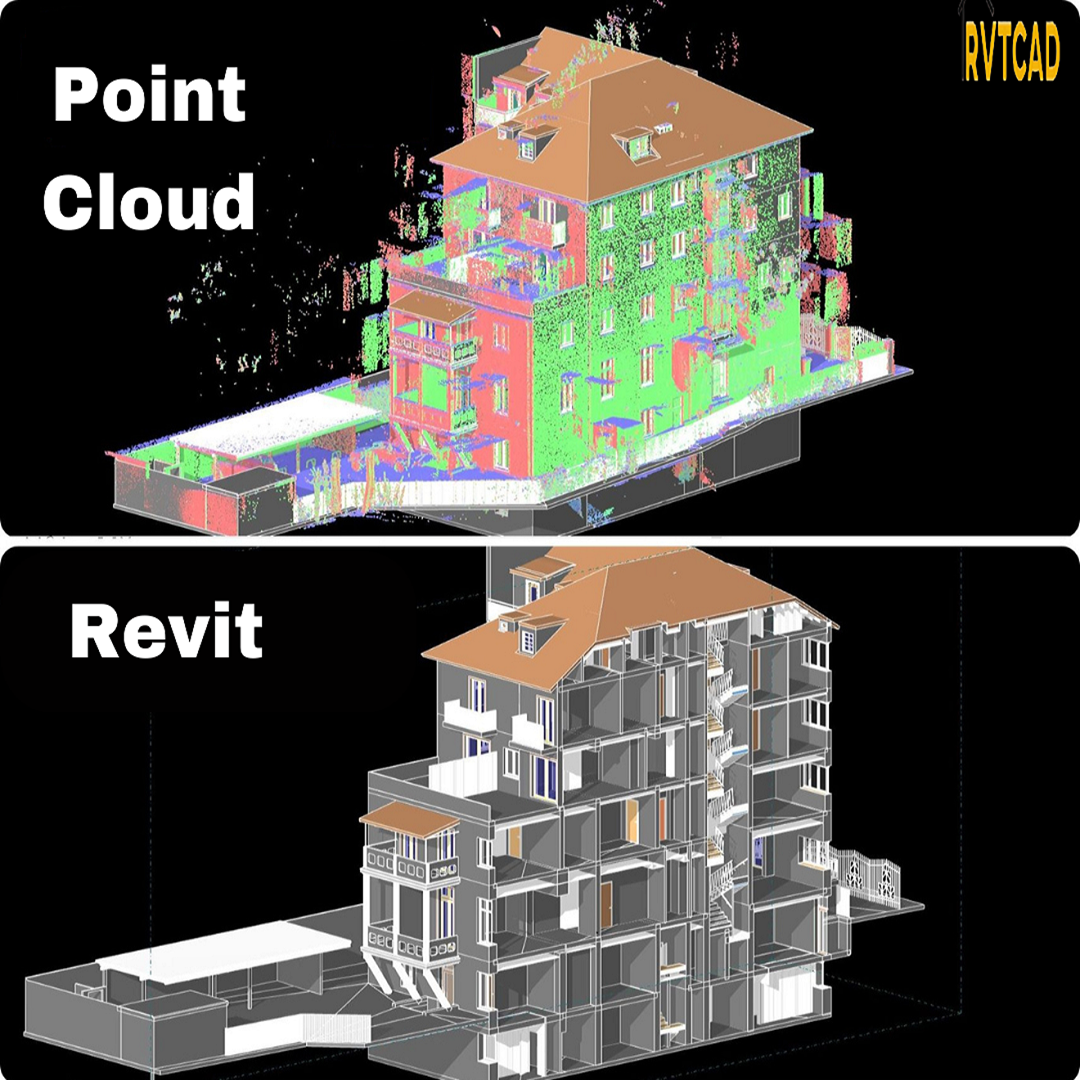
Leica CloudWorx for Revit is a transformative plug-in designed to streamline the integration of as-built point cloud data directly into Revit. This powerful tool, leveraging data captured by laser scanners, significantly enhances Building Information Modeling (BIM) for existing structures. It caters to a broad spectrum of BIM applications, including retrofit design, construction, operations, and comprehensive lifecycle asset management, effectively providing a virtual site visit within the Revit environment.
The plug-in’s strength lies in its ability to harness the familiar Revit interface, thereby minimizing the learning curve associated with handling laser scan data. Leica CloudWorx empowers Revit users to efficiently visualize and construct BIM models from extensive point cloud datasets, offering the performance of a dedicated point cloud application seamlessly within Revit.
This solution offers specialized tools for accurately fitting steel, flanges, pipes, and 2D lines. Furthermore, it facilitates the placement of walls, floors, structural members, doors, windows, mechanical equipment, and more. Leica CloudWorx for Revit also supports the direct import of COE models from Cyclone and allows for the export of Revit models as COE, enabling users to bring lightweight Revit-created models into Cyclone for further analysis.
Features and Benefits
Leica CloudWorx for Revit provides a robust set of features and benefits designed to enhance BIM workflows:
- Flexible Data Sources: Supports LGSx, Cyclone, or ReCap data sources, with LGSx offering superior speed and fidelity.
- Universal Scanner Compatibility: Enables users to work with point clouds from any laser scanner or 3D sensor directly within Revit.
- Eliminates Export/Import Hassles: Removes the need for time-consuming point cloud file format conversions.
- Efficient Data Manipulation: Allows for faster manipulation and navigation of large point cloud datasets, including slices, sections, and limit boxes.
- Direct Model Placement: Facilitates the placement of any Revit model item (walls, floors, structural members, etc.) by picking directly on the point cloud.
- Automated Fitting Tools: Includes steel, flange, automatic pipe, and 2D line fitters for precise modeling.
- Intelligent As-Builts: Offers catalog fitting for intelligent as-built documentation.
- Modeling Out-of-Plumb Walls: Supports the modeling of walls that are not perfectly vertical.
- Cyclone COE Model Support: Features direct import and export of Cyclone COE models.
- Clash Detection: Integrated Clash Manager for clash and anti-clash detection with an export utility for reporting.
- Level and Work Plane Setting: Allows direct setting of Building Levels and Work Planes from the point cloud.
- Pipe and Column Analysis: Automatically finds the center-line and diameter of pipes, round ducts, and columns.
- Project Environment Settings: Saves project environment settings for recurring projects.
- TruSpace Layers: Supports various TruSpace layers including RGB, HDR, greyscale intensity, hue intensity, and IR with temperature data.
- Full Leica Geosystems Support: Complete compatibility with Leica Geosystems universal digital realities files (LGS), including Layers, GeoTags, and Assets.
- Cloud-to-Model Alignment: Enables easy unification of as-built conditions from scans with design intent from models.
- Multilingual Support: Localized in English, French, German, Italian, Spanish, Japanese, Chinese (simplified and traditional), Russian, and Korean.
CloudWorx Viewer for Revit: Enhancing Collaboration
The CloudWorx Viewer for Revit is an essential tool for AEC project collaboration. It integrates with data streaming from Reality Cloud Studio powered by HXDR, simplifying project stakeholder management and data sharing for distributed teams. This free plug-in allows for quick and efficient streaming of scanning data into Revit without the requirement for large local files. Users can visually inspect the point cloud against existing models, clip areas of interest, or isolate specific classification categories relevant to their project needs.
For those looking to explore this functionality further, you can download the viewer and access a comprehensive guide:
- Download CloudWorx Viewer for Revit
- Your Guide to the CloudWorx Viewer for Revit
Resources and Related Products
Leica offers extensive resources, including data sheets, technical specifications, videos, case studies, and software installers to support users of CloudWorx for Revit.
Downloads
- Data Sheets:
- Technical Specifications:
- Software Installers:
- Leica CloudWorx for Revit installer
- Leica CloudWorx Viewer for Revit installer
- Release Notes:
- Leica CloudWorx release notes
Videos
Demonstrations of CloudWorx for Revit’s capabilities are available, including:
- Exporting Clash Manager Results for Reports
- Fitting doors, columns, and pipes
- Steel fitting with TruSpace
- Converting polylines to walls
Case Studies
Explore how reality capture technology has been successfully implemented in various projects through Reality Capture Case Studies.
Services
Leica Geosystems offers a range of support services, including:
Related Products
Leica offers a comprehensive ecosystem of products that complement CloudWorx for Revit:
- Laser Scanners: Leica BLK2GO, BLK360, RTC360, ScanStation P30/P40, and P50.
- Software: Leica Cyclone, TruView, Cyclone ENTERPRISE (formerly JetStream), and Map360.
- Accessories: A wide range of 3D Laser Scanning Accessories are available.
Leica CloudWorx for Revit stands as a powerful solution for professionals seeking to bridge the gap between real-world conditions and digital design, driving efficiency and accuracy in BIM projects.