
Keeping accurate records of vehicle servicing is one of the easiest ways to extend the lifespan of a car, reduce unexpected repair costs, and stay organized. A vehicle maintenance log template helps drivers and fleet managers document repairs, maintenance schedules, mileage, and expenses in one convenient spreadsheet.
Whether you own a single car or manage multiple vehicles for a business, using a maintenance tracking spreadsheet can simplify routine upkeep and help you avoid unnecessary services. This guide explains how to use a vehicle maintenance log effectively, what features matter most, and how a fleet inventory worksheet can improve vehicle management.
Why Use a Vehicle Maintenance Log Template?
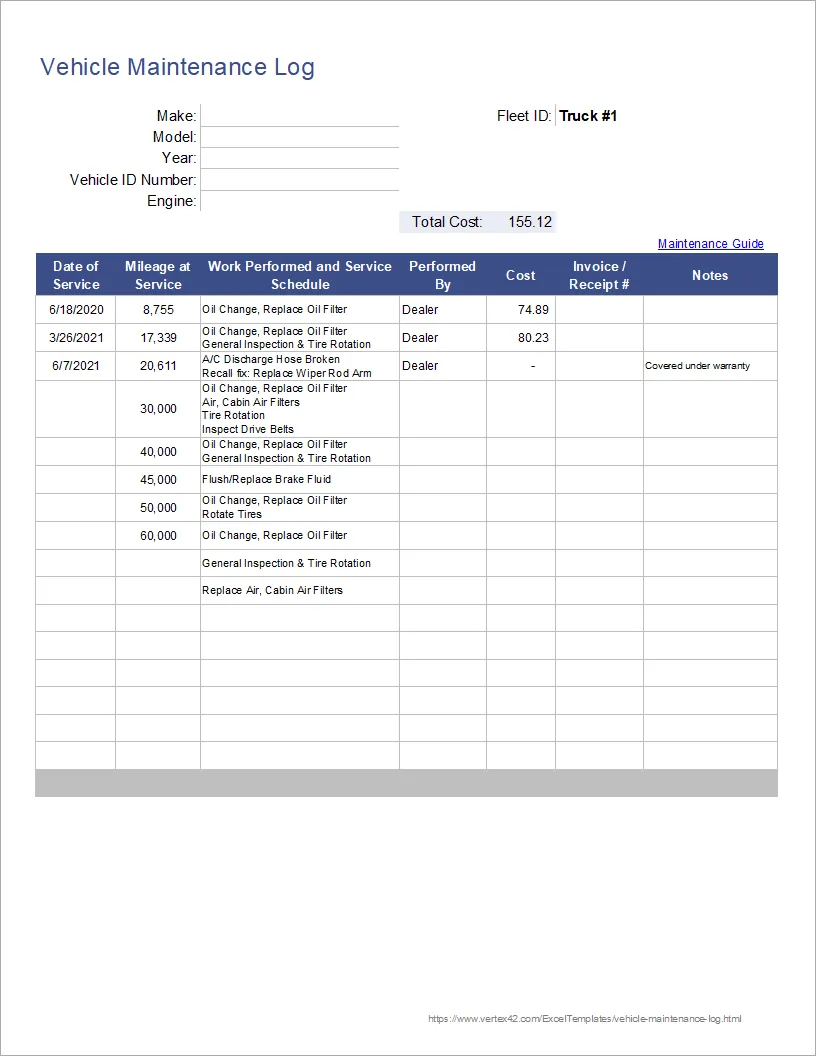
A vehicle maintenance log is designed to record every important maintenance activity performed on a vehicle. Instead of relying on memory or scattered receipts, you can maintain a centralized record of:
- Service dates
- Repairs completed
- Mileage at service
- Maintenance costs
- Invoice or receipt numbers
- Scheduled future maintenance
By keeping these details organized, you can quickly review your vehicle’s history before visiting a mechanic. This is especially useful when determining whether recommended services are truly necessary.
Many vehicle owners also use the spreadsheet as a preventive maintenance schedule. Rather than only documenting completed repairs, the log can help plan upcoming oil changes, tire rotations, fluid replacements, and inspections.
Key Features of the Maintenance Log Spreadsheet
The spreadsheet template includes several practical columns and fields that make tracking maintenance straightforward, even for users with minimal spreadsheet experience.
Essential Tracking Columns
The maintenance log typically contains:
- Date of service
- Work performed
- Mileage at the time of service
- Service cost
- Invoice or receipt reference number
These fields create a detailed service history that can also increase resale value by proving that the vehicle was properly maintained.
After entering your maintenance records, the spreadsheet automatically calculates the total expenses using a built-in SUM() formula.
Vehicle Information Section
At the top of the worksheet, you can store important vehicle details such as:
- Make
- Model
- Year
- Engine type
This information becomes especially valuable when referencing manufacturer-recommended service intervals.
Finding a Recommended Maintenance Schedule
If you no longer have the maintenance guide that originally came with your vehicle, you can still access manufacturer recommendations online. Many drivers use trusted automotive resources to review service intervals for oil changes, brake inspections, transmission servicing, and coolant replacement.
Using a maintenance schedule alongside your log allows you to compare mechanic recommendations with official manufacturer guidance. This can help you avoid paying for unnecessary maintenance packages.
After reviewing the recommended schedule, you can add future service reminders directly into your spreadsheet for better long-term planning.
Easy to Use in Excel and Google Sheets
One of the biggest advantages of this vehicle maintenance tracker is its simplicity. The template works well in both Microsoft Excel and Google Sheets, making it accessible across devices and operating systems.
Even users with very little spreadsheet knowledge can begin using the template immediately. Helpful spreadsheet tips are often included directly within the worksheet, including techniques like:
- Using
Alt + Enterto create a new line inside a cell - Copying formulas across rows
- Expanding notes for detailed service descriptions
Because the spreadsheet structure is straightforward, it is also easy to customize for personal or business use.
Fleet Inventory Worksheet for Multiple Vehicles
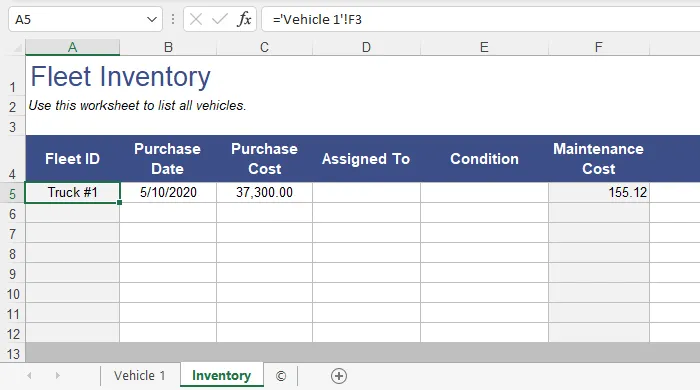
Businesses and families managing multiple vehicles can benefit from the added fleet inventory worksheet. This feature simplifies maintenance tracking across an entire fleet by organizing information for each vehicle in one place.
Benefits of the Fleet Inventory Sheet
The fleet worksheet helps users:
- Identify vehicles quickly
- Track maintenance costs by vehicle
- Organize logs for multiple cars or trucks
- Reference total expenses from each maintenance worksheet
A dedicated Fleet ID field makes it easier to identify vehicles using a nickname, code, or assigned number.
Creating Separate Vehicle Logs
To manage several vehicles, you can duplicate the maintenance worksheet within the spreadsheet file.
The process is simple:
- Right-click the worksheet tab
- Select Move or Copy
- Create a duplicate worksheet
- Rename it based on the vehicle name or number
For example, you could create tabs such as:
- Vehicle 1
- Delivery Truck A
- Company SUV
- Service Van 3
The fleet inventory worksheet can then reference data from each vehicle log using simple spreadsheet formulas.
Best Practices for Vehicle Maintenance Tracking
To get the most value from your maintenance spreadsheet, it is important to keep records updated consistently.
Record Every Service Immediately
Enter maintenance information as soon as work is completed. Delayed updates can lead to missing invoices, forgotten mileage readings, or inaccurate cost tracking.
Save Receipts and Invoice Numbers
Including invoice references in your log makes it easier to verify repairs later. This can be useful for warranty claims, tax reporting, or resale documentation.
Monitor Long-Term Costs
Over time, your spreadsheet can reveal patterns in maintenance spending. If repair costs begin increasing significantly, it may indicate that replacing the vehicle is more cost-effective than continued repairs.
Follow Manufacturer Recommendations
Using official service intervals helps maintain reliability and can prevent unnecessary maintenance. Combining a maintenance schedule with your spreadsheet provides a balanced and organized approach to vehicle care.
Conclusion
A well-organized vehicle maintenance log template is a practical tool for tracking repairs, monitoring service costs, and planning preventive maintenance. Whether you use Excel or Google Sheets, the template makes it easier to maintain accurate records and stay informed about your vehicle’s condition.
For businesses managing multiple vehicles, the fleet inventory worksheet adds another layer of organization by simplifying maintenance tracking across an entire fleet.
By keeping detailed maintenance records and following manufacturer-recommended schedules, you can reduce unexpected repairs, improve vehicle reliability, and make smarter long-term ownership decisions.