
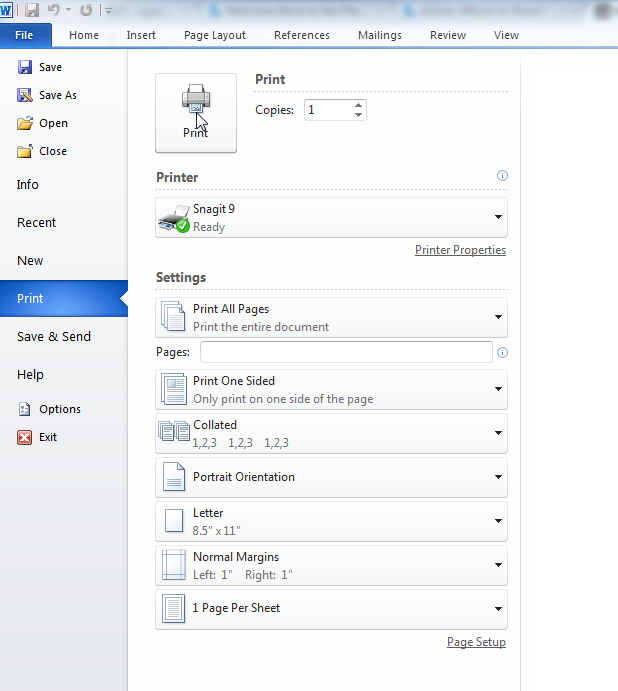
Microsoft Word 2010 remains one of the most recognized versions of Microsoft’s flagship word processing software. Released as part of the Microsoft Office 2010 suite, it arrived at a pivotal moment when productivity tools were evolving toward modern interfaces while still prioritizing robust desktop performance. For millions of users across schools, businesses, and home offices, Microsoft Word 2010 became the go-to standard for document creation — and understanding what made it stand out helps explain why it left such a lasting impression.
What Made Microsoft Word 2010 Stand Out
Word 2010 built upon the Ribbon interface first introduced in Office 2007, refining it to feel more intuitive and accessible for everyday users. Rather than reinventing the wheel, Microsoft focused on making existing workflows smoother and more efficient — a design philosophy that resonated strongly with both beginners and experienced professionals.
Key Features and Document Formatting Tools
One of the most significant improvements in Word 2010 was the enhanced Styles panel and the introduction of the Navigation Pane, which allowed users to jump between headings and sections in long documents with ease. For anyone working on academic papers, legal reports, or business proposals, this was a genuine productivity upgrade.
Other notable features included:
- Improved paste preview: Users could see exactly how pasted content would appear before committing to the action, reducing formatting errors.
- SmartArt graphics: A built-in tool for creating professional diagrams, org charts, and visual layouts without needing third-party design software.
- Enhanced image editing: Basic photo corrections, artistic effects, and background removal were now possible directly within the application.
- Better table customization: More control over borders, shading, and cell formatting gave documents a polished, professional appearance.
These additions collectively supported efficient document formatting, helping users maintain visual consistency across a wide range of file types.
Collaboration and Document Review Capabilities
Word 2010 made meaningful improvements to its Track Changes and commenting features, which became essential tools in corporate and academic environments. Multiple reviewers could annotate a document clearly, with each contributor’s changes color-coded and labeled — making structured document review workflows far more manageable.
However, it is worth noting a key limitation: collaboration in Word 2010 was largely offline and sequential. Unlike modern cloud-based word processors, simultaneous real-time editing was not supported. Teams typically shared documents via email or shared network drives, with one person editing at a time. For the standards of 2010, this was perfectly adequate — but compared to today’s cloud-first tools, it reflects the generational gap in collaborative technology.
Performance and Offline Reliability
One of Word 2010’s most praised qualities was its performance efficiency. The application launched quickly even on modest hardware, handled large documents without significant slowdown, and made reliable use of system resources. Features like Autosave and document recovery significantly reduced the risk of losing work due to unexpected crashes or power interruptions — a critical reliability factor for productivity software.
For users working in environments without consistent internet access, Word 2010’s stable offline performance was a major advantage. Everything from formatting to spell-check to mail merge functioned entirely without a network connection, making it dependable in a broad range of professional settings.
Legacy Status and Support Considerations
It is important for current users to understand that Microsoft Word 2010 is now legacy software. Microsoft officially ended extended support for Office 2010 on October 13, 2020, meaning the application no longer receives security patches, bug fixes, or compatibility updates. While the software continues to function for basic tasks, its lack of ongoing maintenance means it is increasingly vulnerable to security risks and incompatibility with newer file formats and operating systems.
Users still running Word 2010 may encounter:
- Compatibility warnings when opening files created in newer versions of Word
- Missing integrations with modern cloud services like OneDrive or Microsoft 365
- Security vulnerabilities that will not be patched by official updates
- Limited support for newer operating system features in Windows 10 and Windows 11
For users who rely on the software for sensitive or business-critical documents, upgrading to a supported version of Microsoft Word or transitioning to Microsoft 365 is strongly recommended.
How Word 2010 Compares to Modern Alternatives
The landscape of word processing software has shifted considerably since 2010. Tools like Microsoft 365, Google Docs, and LibreOffice Writer now offer real-time collaboration, cloud storage integration, and continuous feature updates that Word 2010 simply cannot match.
That said, Word 2010 still holds its own in certain scenarios:
| Feature | Word 2010 | Microsoft 365 | Google Docs |
|---|---|---|---|
| Offline editing | ✅ Full support | ✅ Full support | ⚠️ Limited |
| Real-time collaboration | ❌ Not supported | ✅ Full support | ✅ Full support |
| Security updates | ❌ Ended 2020 | ✅ Ongoing | ✅ Ongoing |
| Cost | One-time (discontinued) | Subscription | Free |
| Advanced formatting | ✅ Strong | ✅ Excellent | ⚠️ Basic |
For users who prioritize advanced document formatting tools and do not require cloud collaboration, the core editing experience in Word 2010 remains functional. However, the absence of security support is a significant drawback that should not be overlooked.
Who Still Uses Microsoft Word 2010?
Despite its legacy status, Word 2010 continues to be used in certain contexts:
- Small businesses and organizations with older IT infrastructure that have not yet migrated to modern software
- Educational institutions in regions where software licensing is a financial constraint
- Individual users who prefer the simplicity of offline, one-time-purchase software
- Archival and document compatibility scenarios where older file formats need to be preserved
For these users, Word 2010’s familiar interface, reliable performance, and comprehensive word processing features still deliver genuine value — provided security limitations are carefully managed.
Conclusion
Microsoft Word 2010 represents a defining chapter in the evolution of office productivity software. Its refined Ribbon interface, powerful document formatting tools, and reliable offline performance made it one of the most trusted writing tools of its era. The improvements it brought to collaboration workflows, SmartArt design, and document navigation set a standard that influenced how users think about word processing to this day.
That said, its end-of-life status is a reality that cannot be ignored. Without ongoing security updates or modern integrations, Word 2010 is best viewed as a legacy tool rather than an active solution for professional use. For anyone still relying on it, now is a good time to evaluate the transition to a supported platform — whether that is Microsoft 365, a free alternative like LibreOffice, or another modern word processing solution that meets your current needs.
If you found this review helpful, consider exploring our other guides on office productivity software, document formatting best practices, and tips for migrating from legacy Microsoft Office versions to modern tools.