
Whether you’re a dedicated gamer, an audiophile, or someone who spends long hours in front of a screen for work, the right PC speaker setup can completely transform how you experience sound. In 2025, the market is packed with options — from sleek Bluetooth speakers to powerful 2.1 systems with dedicated subwoofers — and navigating all those choices isn’t always straightforward. This guide breaks down exactly what to look for and which models stand out this year.
Key Criteria to Consider Before Buying PC Speakers
Choosing the right PC speaker isn’t just about price. Before committing to a purchase, consider these core factors.
Sound Quality
Wattage (W RMS): This is the true measure of a speaker’s power output. A higher RMS rating generally means louder, cleaner sound — don’t be fooled by peak wattage claims.
Frequency response: A wide range (ideally 20Hz–20kHz) ensures the speaker can reproduce both deep bass and crisp highs accurately.
Total Harmonic Distortion (THD): Expressed as a percentage, this measures how much the audio is distorted during playback. The lower the THD, the more faithful the sound reproduction.
Connectivity Options
Wired connections — including 3.5mm jack, RCA, and USB — offer the most stable, latency-free audio signal.
Wireless options like Bluetooth and Wi-Fi give you more flexibility and a cleaner desk setup, though some users may notice slight latency with certain titles or content.
Extra inputs can add serious value: a headphone jack for late-night sessions, or an optical input for connecting a TV or gaming console alongside your PC.
Primary Use Case
Gaming: Prioritize deep bass response, wide soundstage, and immersive spatial audio capabilities.
Music listening: A stereo 2.0 or 2.1 system with a broad dynamic range will serve you better than gaming-tuned speakers.
Work and video calls: Look for integrated microphones, balanced mid-range clarity, and compact designs that don’t overwhelm a home office desk.
Top PC Speakers of 2025: Category-by-Category Breakdown
Here’s a curated look at the best options across different use cases and budgets.
Best Gaming PC Speaker: Logitech G560
The Logitech G560 is purpose-built for gamers who want their audio setup to match the intensity of their play. It features DTS:X Ultra surround sound for a genuinely immersive listening experience, along with RGB lighting effects that sync dynamically with on-screen content. Connectivity options include both Bluetooth and a 3.5mm jack, giving you flexible setup choices.
Best PC Speaker for Music: Logitech Z906
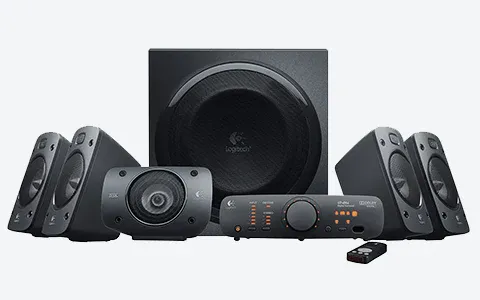
If high-fidelity audio is your priority, the Logitech Z906 delivers an exceptional listening experience. Built with MDF wood enclosures to minimize vibration and resonance, it produces deep, accurate bass alongside clear mids and highs. This is a go-to recommendation for anyone who treats their PC as a primary music system.
Best Speaker for Demanding Gamers: Razer Nommo V2
The Razer Nommo V2 is a 2.1 system carrying THX certification — a meaningful quality benchmark that signals the speakers meet professional audio standards. The dedicated subwoofer delivers powerful low-end response, and connectivity covers USB, Bluetooth, and 3.5mm jack. For gamers who want reference-grade audio without a full home theater setup, this is a compelling choice.
Best Desktop PC Speaker: Creative Pebble Plus
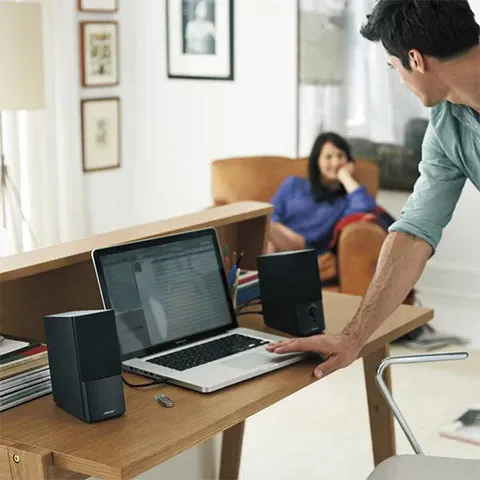
For users who need quality sound without sacrificing desk space, the Creative Pebble Plus hits the right balance. Its compact, minimalist design suits small workspaces, it draws power entirely through USB (no separate power brick required), and the included down-firing subwoofer adds enough bass presence to make a genuine difference in both music and video content.
Best Budget PC Speaker: Trust Tytan 2.1
The Trust Tytan 2.1 punches well above its price point. With 60W RMS output, dedicated bass and volume controls, and a solid 2.1 configuration, it offers an audio experience that many more expensive systems struggle to match at this price. If you’re setting up a first gaming or home office system without a big budget, this is the place to start.
Tips to Maximize Your PC Speaker Performance
Even the best hardware needs the right setup to perform at its peak. A few simple adjustments can make a notable difference.
Speaker placement matters more than most people realize. Position your speakers at ear level when seated, angled slightly inward toward your listening position. This creates a proper stereo image and ensures you’re hearing the sound the way it was designed to be delivered.
Use your system’s equalizer settings. Most operating systems and audio software include built-in EQ controls. Dialing in a slight bass boost for gaming or emphasizing the mids for voice clarity during calls can noticeably improve your experience.
Consider an external sound card or DAC. Onboard motherboard audio has improved significantly, but a dedicated external DAC or USB audio interface will still provide cleaner signal output and lower noise floor, especially with higher-end speakers.
Prioritize lossless audio formats when possible. Files in FLAC or WAV preserve the full audio data that compressed formats like MP3 discard, and the difference is audible on quality speakers.
FAQ: Common PC Speaker Questions Answered
What’s the difference between a 2.0 and 2.1 speaker system?
A 2.0 system uses two satellite speakers and handles the full frequency range between them. A 2.1 system adds a dedicated subwoofer, which takes over the low-frequency reproduction and typically results in noticeably richer, deeper bass.
Are Bluetooth PC speakers as good as wired ones?
Bluetooth audio quality has improved dramatically over recent years, with aptX and LDAC codecs closing much of the gap. That said, wired connections still offer more consistent stability and zero latency — which matters for gaming and video work where audio sync is critical.
Can you use PC speakers with a gaming console?
Yes — as long as the speaker system has a compatible input. Most consoles support 3.5mm audio output (via the controller), while others offer optical or HDMI audio extraction options. Check your console’s audio output format before purchasing.
How do you extend the lifespan of PC speakers?
Avoid running speakers at maximum volume for extended periods, as this stresses the speaker drivers and can cause distortion or permanent damage over time. Keep the grilles clear of dust buildup, which can affect both sound quality and heat dissipation. When speakers won’t be used for an extended period, unplugging them is good practice.
Conclusion: Which PC Speaker Should You Choose in 2025?
The best PC speaker for you depends entirely on what you’re using it for and how much you’re willing to spend. The Logitech G560 remains the top pick for gamers who want an immersive, feature-rich experience. The Logitech Z906 is the choice for music enthusiasts who won’t compromise on fidelity. Budget-conscious buyers will find excellent value in the Trust Tytan 2.1, and anyone working with limited desk space should look seriously at the Creative Pebble Plus.
Whatever your setup looks like, investing in quality PC audio pays dividends every time you sit down — whether you’re deep in a game, listening to music, or grinding through a long workday. Browse the full selection of available models and find the one that fits your needs.
References
- Logitech G560 LIGHTSYNC PC Gaming Speaker — logitech.com
- Logitech Z906 Surround Sound Speaker System — logitech.com
- Razer Nommo V2 Product Page — razer.com
- Creative Pebble Plus Desktop Speakers — creative.com
- Trust Tytan 2.1 Speaker Set — trust.com