
AutoCAD remains the industry standard for computer-aided design (CAD) software, serving as an indispensable tool across engineering, architecture, construction, and industrial design. Developed by Autodesk, this powerful application enables professionals to create precise 2D drawings and complex 3D models that drive modern innovation. For residents of Montreal looking to master this essential software, the city offers a wealth of training opportunities ranging from university-level courses to personalized tutoring.
Where to Learn AutoCAD in Montreal
Montreal’s educational landscape provides numerous pathways for acquiring AutoCAD proficiency. Whether you’re a student preparing for a career in design, a professional seeking to upgrade your skills, or someone exploring a new field, the city’s institutions cater to various learning styles and objectives.
Concordia University – AutoCAD I Course
Concordia University’s Continuing Education department offers a foundational AutoCAD course designed for those seeking structured, academic instruction. This 30-hour program combines theoretical knowledge with hands-on practical experience, taught by industry professionals who bring real-world insights into the classroom.
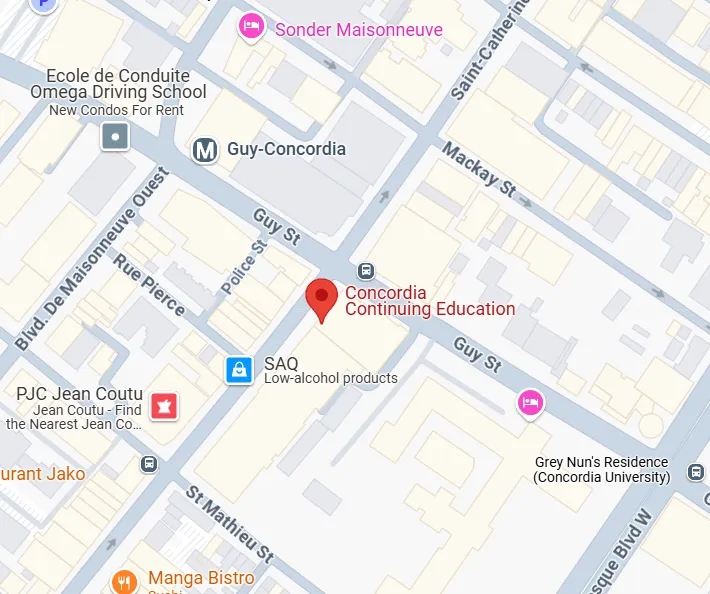
Course Details:
- Location: Room FB-117, 1600 Ste-Catherine St. W., Montreal, QC H3H 2S7
- Format: Live virtual classroom sessions with interactive projects
- Curriculum: Basic CAD terminology, AutoCAD principles, menu navigation, command usage, and 2D drawing creation and presentation
- Target Audience: College students, CEGEP students, engineers, technicians, and anyone needing foundational CAD skills for architecture, engineering, or manufacturing
The course emphasizes integrated learning through varied projects, allowing students to work with the latest software versions while receiving guidance from experienced professionals. This approach ensures graduates leave with practical skills directly applicable to workplace environments.
Admission: Prospective students should contact cce@concordia.ca for detailed admission requirements.
Tuition: 840 CAD
The Knowledge Academy – Professional AutoCAD Training
For those seeking intensive professional development, The Knowledge Academy delivers comprehensive AutoCAD training with flexible delivery options. Their programs accommodate both in-person and online participation, making them accessible regardless of your schedule or location.

The curriculum covers essential topics including system requirements, user interface navigation, drafting techniques, technical illustration methods, and practical design applications. Participants benefit from direct interaction with highly qualified instructors who can address specific questions and provide tailored guidance.
Prerequisites: No prior AutoCAD knowledge is required, though basic computer familiarity is recommended.
Tuition: Starting at 1,695 CAD
Collège de la Concorde – Practical AutoCAD Program
Collège de la Concorde offers an AutoCAD program focused on developing practical skills through real-world scenarios. This advanced training curriculum targets professionals already working in mechanical engineering, cartography, architecture, design, and electronics sectors, as well as individuals seeking to expand their existing CAD knowledge.
Program Features:
- Hands-on Approach: Exercises and projects based on authentic industry situations
- Flexible Formats: Choose between online or face-to-face instruction
- Weekend Schedule: Practical workshops held Saturdays and Sundays (13:00–16:00)
Admission Requirements:
- Minimum age of 18 years
- Completion of 5th grade secondary education
- High school diploma
- Resume submission
- Valid legal status in Canada
Tuition Options:
- Online Modality: 250 CAD for 8 weeks
- Face-to-Face Modality: 350 CAD for 8 weeks
Digital Learning Resources for AutoCAD
The internet has democratized access to AutoCAD education, with numerous platforms offering high-quality content for learners at all levels. These resources complement formal instruction and provide flexibility for self-directed study.
Autodesk University
As the software’s developer, Autodesk provides an extensive library of free resources through Autodesk University. This platform connects users with design and engineering experts across diverse industries, offering courses, tutorials, and community forums. The content ranges from beginner fundamentals to advanced techniques used by industry leaders.
LinkedIn Learning
LinkedIn Learning delivers structured, professionally produced AutoCAD courses suitable for both beginners and advanced users. Their curriculum is organized in a progressive format, allowing learners to build skills systematically while earning certificates that can be displayed on professional profiles. Course quality is maintained through rigorous production standards and instruction from recognized industry experts.
Udemy
Udemy hosts a vast collection of AutoCAD video courses covering specialized topics including:
- Civil engineering applications
- Technical drawing fundamentals
- Architectural design workflows
- Landscaping and site planning
- AutoCAD Civil 3D for infrastructure
- Mechanical design and assemblies
- Electrical systems design
- Construction documentation
- Building Information Modeling (BIM) integration
The platform’s user review system helps learners identify courses that match their skill level and learning objectives.
YouTube
YouTube remains one of the most accessible AutoCAD learning tools, featuring countless channels dedicated to CAD instruction. From quick tips to comprehensive tutorials, the platform offers content for every skill level at no cost. Many professional CAD users maintain channels where they share workflows, shortcuts, and problem-solving techniques.
Evaluating AutoCAD Training Value
Understanding AutoCAD’s capabilities helps contextualize the value of proper training. The software’s versatility spans multiple professional domains, making it a worthwhile investment for career development.
2D Drafting Applications
AutoCAD excels at creating highly accurate 2D drawings essential for:
- Architectural plans incorporating walls, doors, windows, and furniture layouts
- Technical machinery schematics and component designs
- Urban planning maps and zoning documentation
- Electrical diagrams and wiring systems
3D Modeling Capabilities
The software’s 3D functionality enables:
- Complex architectural structures with realistic textures and materials
- Engineering component assemblies and mechanical designs
- Simulation tools that test designs under real-world conditions
Documentation and Workflow Efficiency
AutoCAD streamlines documentation through:
- Complete construction drawing sets with automated dimensioning
- Step-by-step assembly guides for mechanical components
- Automatic bill of materials generation from design data
Customization Options
Advanced users can extend AutoCAD’s functionality through:
- AutoLISP and VBA support for command automation
- Reusable block libraries for standard components
- API integration with other software systems
Understanding the Learning Curve
The time required to learn AutoCAD varies significantly based on prior experience with design software and individual aptitude. Beginners typically need several weeks of consistent practice to master basic 2D drafting concepts. Advanced 3D modeling proficiency generally requires several months of dedicated study and hands-on application.

Personalized instruction significantly accelerates the learning process. Working one-on-one with an experienced tutor allows for immediate feedback, targeted skill development, and the ability to address specific challenges as they arise. This approach proves particularly valuable for complex topics like 3D modeling and parametric design.
Superprof: Personalized AutoCAD Instruction in Montreal
While institutional courses provide structured learning environments, personalized tutoring offers distinct advantages for mastering AutoCAD. Superprof connects learners with expert AutoCAD tutors specializing in architecture, interior design, mechanical engineering, and related fields.
Advantages of Superprof Tutoring
Personalized Attention
Unlike classroom settings where instructors divide attention among multiple students, Superprof sessions focus entirely on the individual learner. Tutors adapt their teaching methods to match each student’s learning style, ensuring concepts are understood before moving forward.
Goal-Oriented Instruction
Students can concentrate on specific objectives relevant to their needs, whether preparing for professional certification, mastering essential functions for an upcoming project, or exploring advanced modeling techniques. This targeted approach maximizes efficiency.
Immediate Feedback and Correction
Direct interaction with a tutor enables real-time identification and correction of errors. This immediate feedback loop helps prevent the formation of bad habits and accelerates skill development.
Flexible Scheduling
Superprof tutors coordinate schedules to accommodate students’ existing commitments, making consistent learning possible even for those with demanding work or academic schedules.
Format Options
Learners can choose between in-person sessions for hands-on guidance or online lessons for convenience and accessibility.
Affordable Pricing
With tutors offering various rate structures, students can find instruction that fits their budget. Many tutors provide a free first lesson, allowing potential students to assess compatibility before committing.
Making Your Choice
Selecting the right AutoCAD training approach depends on individual circumstances:
For Academic Credit and Structured Learning: Concordia University’s AutoCAD I course provides formal instruction with academic recognition, ideal for students or those seeking credentialed education.
For Intensive Professional Development: The Knowledge Academy offers comprehensive training suitable for career-focused individuals who need to acquire skills quickly.
For Practical, Hands-On Experience: Collège de la Concorde’s program emphasizes real-world applications with flexible weekend scheduling, perfect for working professionals.
For Flexible Self-Paced Learning: Online platforms like LinkedIn Learning and Udemy provide extensive resources for independent study at one’s own pace.
For Personalized, Goal-Oriented Instruction: Superprof’s tutoring network offers the most flexible and tailored approach, adapting to individual learning styles and objectives.
Conclusion
Montreal provides exceptional resources for learning AutoCAD, from university-level courses to specialized training centers and flexible online platforms. The diversity of options ensures that regardless of your background, schedule, or learning preferences, you can find an effective path to mastering this essential design tool.
For those seeking the most adaptable and personalized learning experience, Superprof’s network of qualified tutors offers distinct advantages. The combination of one-on-one instruction, flexible scheduling, and specialized expertise creates an environment conducive to rapid skill development. Whether your goal is career advancement, academic success, or personal project completion, investing time in quality AutoCAD training pays dividends across numerous professional and creative fields.
Consider your learning style, budget constraints, and time availability when evaluating these options. Many learners find success by combining multiple approaches—using online resources for supplementary practice while working with a tutor for guided instruction and accountability. With consistent effort and quality instruction, AutoCAD proficiency is an achievable goal that opens doors to diverse opportunities in design, engineering, and manufacturing.