
If you plan to use Autodesk Revit 2025 for architectural design, BIM workflows, structural modeling, or MEP projects, understanding the right hardware configuration is essential. Choosing a system that meets the system requirements for Autodesk Revit 2025 can significantly improve model performance, reduce loading times, and create a smoother design experience.
Whether you are a student working on small projects, a professional architect managing medium-sized models, or an engineering firm handling complex BIM environments, selecting the appropriate CPU, memory, graphics card, and storage can help maximize productivity and stability.
Minimum System Requirements for Autodesk Revit 2025
Autodesk Revit 2025 requires a 64-bit operating system and modern hardware capable of handling BIM workflows. The minimum configuration is suitable for small projects and entry-level users.
Key minimum specifications include:
- Operating System: Windows 10 64-bit or Windows 11 64-bit
- Processor: Intel Core i-Series, Xeon, AMD Ryzen, or Ryzen Threadripper PRO
- CPU Speed: 2.5 GHz or higher
- Memory: 16 GB RAM
- Graphics: DirectX 11 compatible GPU with Shader Model 5
- Video Memory: Minimum 4 GB VRAM
- Storage: 30 GB free disk space
- Browser: Chrome, Edge, or Firefox
- Framework: .NET 8
- Internet connection required for licensing and downloads
For projects up to approximately 300 MB, 16 GB of RAM is generally adequate for day-to-day editing tasks.
Recommended Hardware for Better Performance
For professionals working with larger BIM models, Autodesk recommends a more powerful configuration.
The recommended specifications include:
- Windows 10 or Windows 11 (64-bit)
- Intel Core i7, Core i9, Xeon, AMD Ryzen, or Threadripper PRO processors
- 32 GB RAM
- DirectX 11 compatible graphics card
- Minimum 4 GB VRAM
- 30 GB or more free SSD storage
- 1680 × 1050 display resolution or higher
- Stable internet connection for collaboration workflows
A system with 32 GB RAM can comfortably handle models approaching 600 MB while supporting multitasking with additional design applications.
High-Performance Workstations for Large Models
Organizations working with complex BIM projects often require significantly more resources.
For advanced Revit workflows, Autodesk recommends:
- 64 GB RAM
- High-frequency processors (3.0 GHz or higher preferred)
- DirectX 11 GPU with 4 GB+ VRAM
- SSD or NVMe storage
- Display resolution of 1920 × 1200 or higher
- Dedicated storage for active project files
These specifications are typically sufficient for models around 1 GB in size and provide better performance when upgrading projects from previous Revit versions.
CPU Requirements and Performance Considerations
Why CPU Speed Matters
Revit relies heavily on single-threaded performance during many modeling and design operations. As a result, processor frequency often has a greater impact than simply having more CPU cores.
Recommended processor families include:
- Intel Core i7
- Intel Core i9
- Intel Xeon
- AMD Ryzen 7
- AMD Ryzen 9
- AMD Ryzen Threadripper PRO
For most users, a high-clock-speed processor delivers the best overall modeling experience.
Does Revit Benefit from Multiple CPU Cores?
Yes, but only for certain tasks.
While many modeling operations rely primarily on one core, rendering and specific computational processes can utilize multiple cores. Users who frequently render inside Revit may benefit from processors with higher core counts.
However, for typical BIM modeling, prioritizing clock speed remains the best strategy.
Graphics Card Requirements
Unlike rendering-focused applications, Revit does not heavily depend on GPU power for most modeling operations. The graphics card mainly handles viewport display and model visualization.
Minimum graphics requirements include:
- DirectX 11 compatibility
- Shader Model 5 support
- 4 GB video memory
For professional environments, certified workstation GPUs are generally preferred.
Recommended options include:
- NVIDIA RTX A4000
- NVIDIA RTX A5000
- NVIDIA RTX A6000
These professional graphics cards offer certified drivers and improved reliability for enterprise BIM workflows.
Professional vs Consumer GPUs
Autodesk officially certifies professional graphics solutions more frequently than consumer gaming cards.
Although many users successfully run Revit on consumer GPUs, professional cards provide:
- Better driver stability
- Vendor certification
- Enhanced support compatibility
- Improved reliability in production environments
Firms that depend on Autodesk support often choose professional workstation graphics for this reason.
How Much RAM Does Revit 2025 Need?
Memory requirements vary based on project complexity and file size.
16 GB RAM
Suitable for:
- Students
- Small residential projects
- Learning environments
- Entry-level BIM workflows
32 GB RAM
Recommended for:
- Professional architects
- Structural engineers
- MEP designers
- Medium-sized BIM projects
64 GB RAM
Ideal for:
- Large commercial developments
- Complex BIM coordination
- Multiple concurrent applications
- Heavy rendering workflows
In many professional environments, 32 GB RAM offers the best balance between performance and cost.
Storage Requirements
SSD vs Traditional Hard Drives
Solid-state drives provide substantial performance improvements for Revit.
Benefits include:
- Faster system boot times
- Faster application launches
- Reduced project loading times
- Improved save performance
- Better overall responsiveness
NVMe SSDs offer the highest performance and are recommended whenever possible.
Recommended Storage Configuration
A practical setup includes:
- Primary NVMe SSD for Windows and Revit
- Secondary SSD for active projects
- Traditional HDD or NAS for backup and archive storage
A minimum 500 GB system drive is recommended to accommodate operating system updates, project files, and software installations.
Revit Cloud Worksharing Requirements
Organizations using cloud collaboration should consider additional storage and network requirements.
Important recommendations include:
- Disk capacity equal to approximately three times the size of all cloud-hosted project files
- Revit Personal Accelerator (PAC) enabled for improved synchronization performance
- Reliable internet connectivity
Recommended network speeds:
| Performance Level | Internet Speed |
|---|---|
| Minimum | 5 Mbps symmetrical |
| Recommended | 10 Mbps symmetrical |
| High Performance | 25 Mbps symmetrical |
Stable network connectivity plays a critical role in cloud-based BIM collaboration.
Revit LT 2025 System Requirements
Revit LT 2025 shares many requirements with the standard version.
Core specifications include:
- Windows 10 or Windows 11 (64-bit)
- Intel or AMD processor at 2.5 GHz or higher
- 16 GB RAM
- DirectX 11 graphics card
- 30 GB free storage
- Chrome, Edge, or Firefox browser
- .NET 8 support
This configuration is appropriate for users who require drafting and BIM capabilities without advanced collaborative features.
Virtualization and Remote Desktop Environments
Many organizations deploy Revit through virtualization platforms.
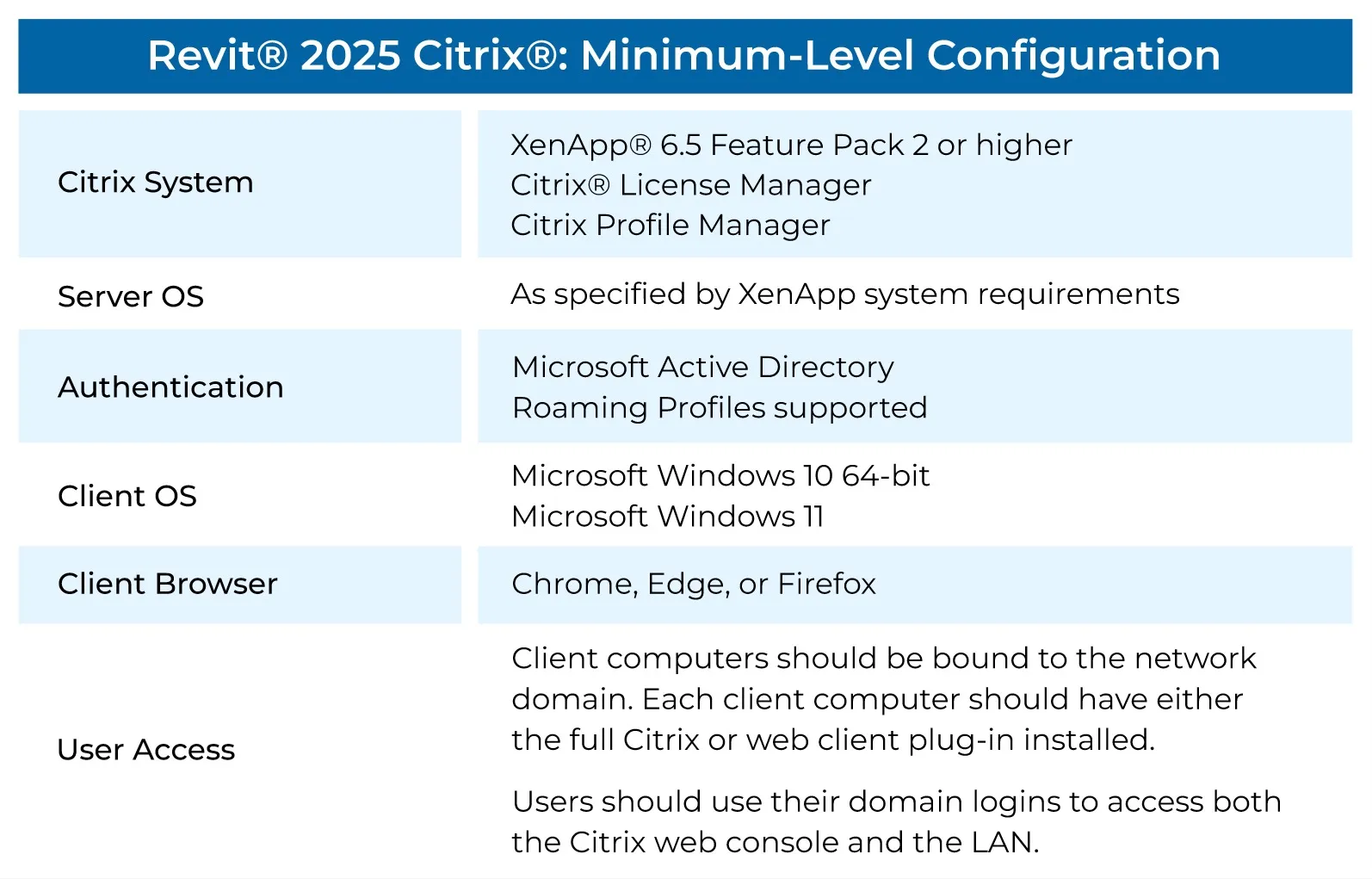
Citrix Requirements
Supported Citrix environments typically include:
- XenApp 6.5 Feature Pack 2 or later
- Active Directory authentication
- Windows 10 or Windows 11 client devices
- Chrome, Edge, or Firefox browsers
Users should install the appropriate Citrix client software for access.
VMware Requirements
For VMware environments, recommended infrastructure includes:
- VMware Horizon 6.1 or newer
- VMware vSphere 6 or newer
- 384–512 GB server memory
- High-performance storage
- 10 GB networking
- NVIDIA GRID or AMD MxGPU acceleration
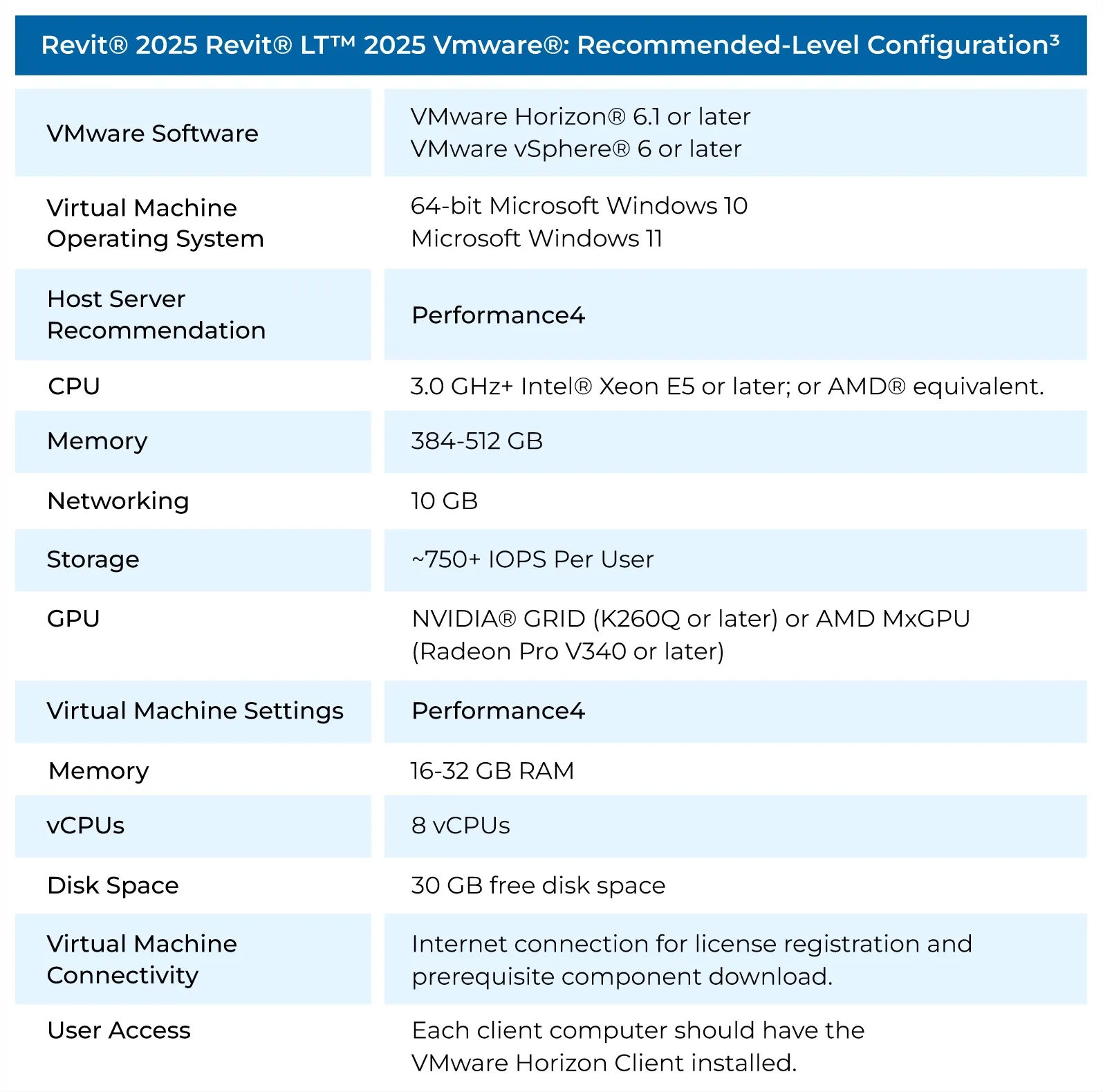
These environments help organizations centralize workstation management while maintaining strong performance.
Running Revit 2025 on Mac
Although Revit is primarily a Windows application, Mac users can run it using virtualization software.
Recommended configuration:
- macOS High Sierra or newer
- Parallels Desktop for Mac
- Windows 10 or Windows 11 virtual machine
- 16 GB RAM or more
- Intel Core i7 or newer processor
- Apple Silicon systems supported through virtualization
- Minimum 4 GB dedicated graphics memory
- 40 GB free storage (100 GB recommended)
Disabling Retina scaling options can help improve display behavior within Revit.
Best Hardware Configuration for Autodesk Revit 2025
For most professionals, the following workstation configuration delivers excellent performance:
| Component | Recommended Specification |
|---|---|
| CPU | Intel Core i9 or AMD Ryzen 9 |
| RAM | 32 GB |
| GPU | NVIDIA RTX A4000 or equivalent |
| Storage | 1 TB NVMe SSD |
| Operating System | Windows 11 64-bit |
| Display | 4K monitor |
| Network | High-speed broadband connection |
This configuration provides strong performance for modeling, visualization, collaboration, and daily BIM workflows.
Additional Resources
For more BIM and workstation guidance, consider exploring:
- Revit performance optimization guide
- Best workstation builds for architects
- BIM collaboration best practices
- Choosing the right GPU for CAD software
Conclusion
Understanding the system requirements for Autodesk Revit 2025 is critical for achieving stable performance and efficient project delivery. While the minimum specifications allow the software to run, professionals will benefit greatly from faster processors, additional RAM, SSD storage, and certified graphics hardware.
For most architects, engineers, and BIM specialists, a system with a high-frequency CPU, 32 GB RAM, a professional GPU, and NVMe SSD storage offers the best balance between performance and investment. Before upgrading hardware, evaluate the size and complexity of your projects to ensure your workstation is properly matched to your workflow.
For additional Autodesk and workstation-related articles, explore our resource library and stay updated on the latest hardware recommendations for design professionals.
References
- Autodesk Revit 2025 Product Documentation and Support Resources.
- Autodesk Product Support Lifecycle Documentation.
- Autodesk Revit LT 2025 Technical Specifications.
- Autodesk Revit Server 2025 Deployment Documentation.
- Industry workstation performance benchmarks for BIM and CAD applications.
- Hardware testing and performance evaluations for Autodesk Revit workflows.