
Revit LT is Autodesk’s streamlined Building Information Modeling (BIM) software designed to help small and mid-sized architecture firms transition from traditional 2D drafting into the world of intelligent 3D design — without the full price tag of the complete Revit suite. For independent design studios, freelance architects, and growing firms looking to modernize their workflow, Revit LT delivers powerful BIM capabilities at a fraction of the cost.
Unlike conventional CAD tools that limit designers to flat 2D drawings, Revit LT enables professionals to build smart, parametric 3D models that automatically update across all related views and documentation. This makes it one of the most practical and accessible BIM platforms available for smaller practices today.
What Is Revit LT?
Revit LT is Autodesk’s entry-level BIM software built specifically for small architecture offices, independent design studios, and freelance professionals who want to move beyond 2D drafting without the complexity or expense of the full Revit platform.
Where AutoCAD LT focuses purely on 2D technical drawing, Revit LT allows users to construct intelligent 3D models — complete with walls, floors, roofs, windows, staircases, and a wide range of architectural components. Every element in a Revit LT model is parametric, meaning that changes made in one location automatically propagate across floor plans, elevations, sections, and schedules.
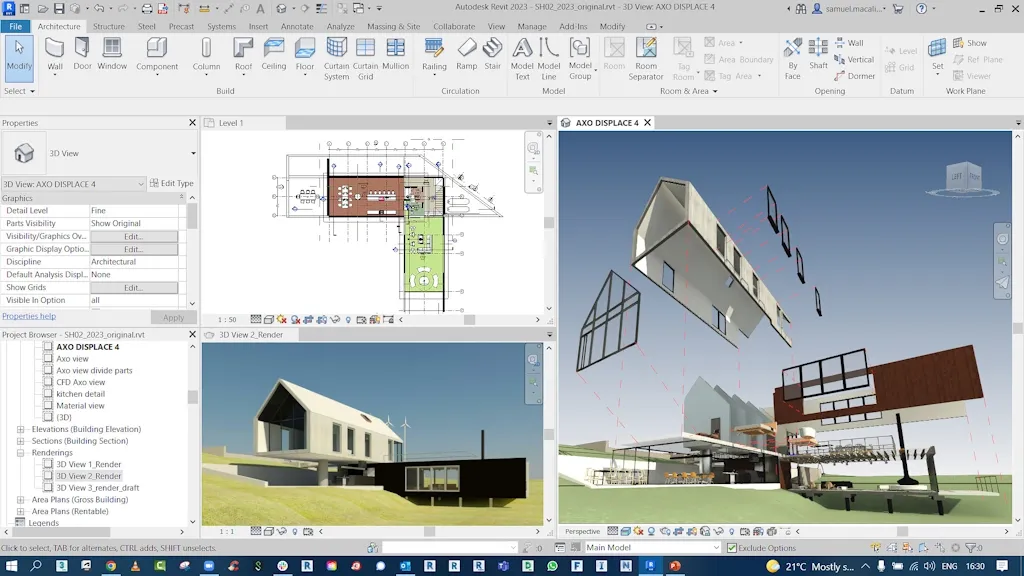
Key advantages of the software include:
- Automatic synchronization of all related drawings whenever the primary model changes
- Significant reduction in inconsistencies between floor plans, sections, and perspective views
- Immersive 3D visualization that helps clients understand design intent quickly
- Compliance with BIM standards increasingly required by government projects and major property developers
Core Features of Revit LT
Parametric 3D Modeling
At the heart of Revit LT is its parametric modeling engine. Architectural elements — walls, doors, roofs, floors — are intelligent objects that can be modified freely without redrawing the entire model. Adjust a wall height or shift a window position, and every affected view updates instantly.
Automated Drawing and Documentation
Once a 3D model is complete, Revit LT automatically generates the full set of 2D technical drawings: floor plans, elevations, sections, and material quantity takeoffs. This dramatically reduces drafting time and minimizes the risk of human error in manual drawing coordination.
Scheduling and Quantity Takeoffs
Revit LT makes it straightforward to generate material schedules, equipment lists, and component inventories directly from the model. These schedules update dynamically, helping teams manage project costs and timelines with greater accuracy.
Annotation and Dimensioning
Intuitive dimensioning tools, symbols, and notation features allow designers to communicate technical intent clearly to both construction teams and clients — all within the same modeling environment.
Multi-Format Compatibility
Revit LT is compatible with a wide range of industry file formats, including DWG, IFC4, SketchUp, Rhino, and OBJ. This flexibility ensures smooth collaboration between BIM-focused design teams and those still working in traditional 2D CAD environments.
Customizable Interface
The Revit LT workspace can be tailored to individual workflows through custom keyboard shortcuts, toolbar arrangements, and a flexible ribbon interface — reducing the learning curve and improving day-to-day efficiency.
Business Benefits of Using Revit LT
Lower Software Investment
Revit LT delivers approximately 80% of the BIM capabilities found in the full Revit suite, at roughly half the cost. For small firms or newly established studios, this makes professional-grade BIM accessible without a major upfront commitment.
Higher Productivity, Fewer Errors
Automatic model updates eliminate the risk of contradictory information appearing across different drawing sheets. Teams spend less time correcting coordination errors and more time developing design quality.
Scalable as Your Firm Grows
When a practice outgrows the capabilities of Revit LT, upgrading to the full version of Revit is straightforward and preserves existing workflows — there is no need to rebuild processes from the ground up.
More Persuasive Client Presentations
Detailed 3D models make design proposals far more compelling than flat 2D drawings. Firms using Revit LT consistently report stronger client engagement and higher success rates in competitive tenders.
Real-World Feedback from Revit LT Users
Architecture professionals who have integrated Revit LT into their practice frequently highlight its impact on both efficiency and competitive positioning:
“Revit LT allows us to compete with larger companies and pursue the projects we actually want to design.” — Architect
“We create drawings much faster with Revit LT, which gives us more time to explore different design options.” — Architectural Designer
“Revit LT lets me explore ideas more deeply and communicate them more accurately to clients.” — Studio Principal
These perspectives reflect a consistent theme: Revit LT is not merely a drafting tool but a strategic upgrade that enables smaller firms to operate at the same professional level as larger competitors.
Revit LT vs. AutoCAD LT: Which Is Right for Your Team?
| Criteria | Revit LT | AutoCAD LT |
|---|---|---|
| Design Approach | 3D BIM modeling | 2D technical drawing |
| Drawing Updates | Automatic and synchronized | Manual adjustments required |
| Best Suited For | Architecture, construction, structural design | Mechanical, electrical, detail engineering |
| Visualization | Full 3D views with materials | 2D only |
| Team Collaboration | High (BIM-based workflow) | Limited |
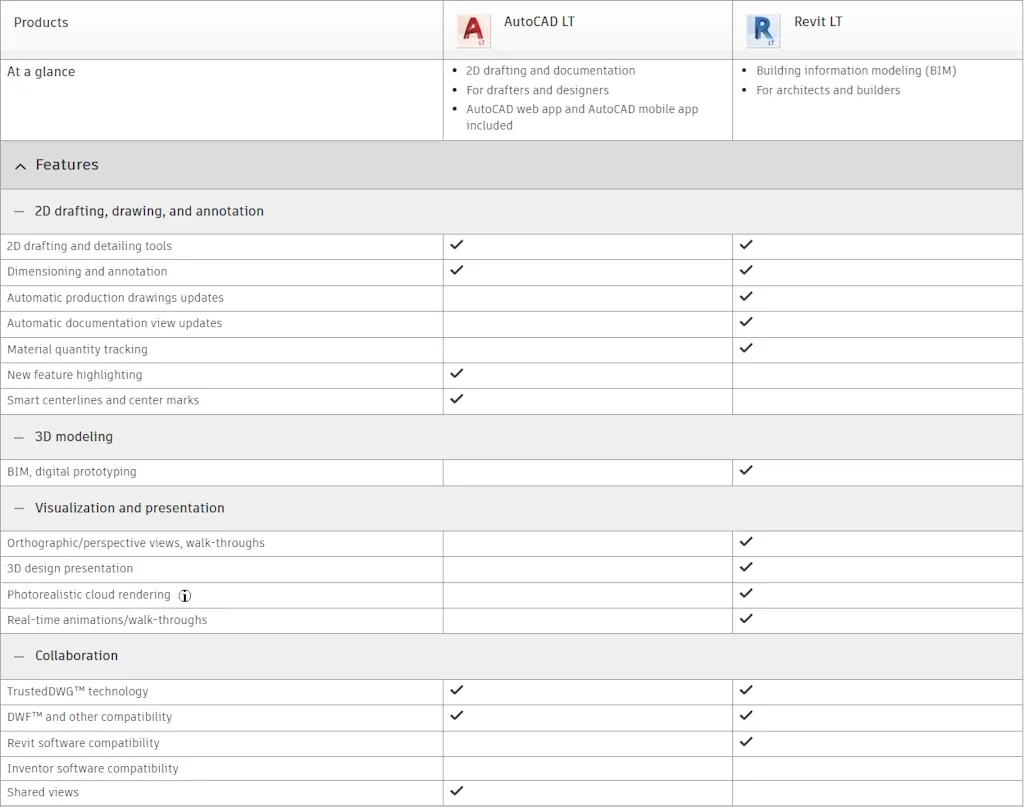
For firms that require both precise 2D documentation and 3D BIM modeling, Autodesk offers the AutoCAD Revit LT Suite — a bundled package that combines both tools at a more favorable price than purchasing them separately.
The AutoCAD Revit LT Suite: Best of Both Worlds
In many design practices, different teams use different tools: the architecture group works in 3D BIM (Revit LT), while the technical or construction team relies on detailed 2D drawings (AutoCAD LT). The AutoCAD Revit LT Suite equips the entire organization with both tools under a single license, offering several key advantages:
- Cost savings: The Suite is significantly cheaper than buying each application independently — savings of up to 28% compared to separate purchases.
- Seamless interoperability: Revit LT exports directly to DWG format, enabling smooth handoffs between BIM and CAD teams.
- Flexible workflows: Design and technical groups can share data without complex file conversion steps.
- Centralized license management: A single subscription covers multiple users across departments, simplifying procurement and compliance.
This bundle is particularly well-suited to firms in the process of transitioning from traditional CAD to BIM — allowing both methodologies to coexist while the practice builds up its BIM capabilities.
Licensing Costs for Revit LT and the AutoCAD Revit LT Suite
| Version | Annual Plan (per month) | Monthly Plan |
|---|---|---|
| Revit LT | $47/month | $70/month |
| AutoCAD LT | $32/month | $45/month |
| AutoCAD Revit LT Suite | $57/month | $85/month |
Annual billing is recommended for firms seeking to reduce costs and simplify license management across teams.
System Requirements for Revit LT (2023 and Later)
To run Revit LT effectively, the following hardware specifications are recommended as a baseline:
- Operating System: Windows 10 or Windows 11 (64-bit)
- Processor: Intel Core i5 or AMD Ryzen 5 or higher
- RAM: 8 GB minimum (16 GB recommended for larger projects)
- Graphics Card: DirectX 11-compatible GPU with 4 GB VRAM
- Storage: At least 30 GB of available disk space
- Display: Minimum resolution of 1920×1080
For firms handling large-scale models or multi-user environments, a dedicated workstation with a multi-core processor, high-speed SSD, and professional GPU — such as an NVIDIA RTX A2000 or equivalent — will significantly improve performance.
Revit LT: A Smart BIM Starting Point for Architecture Firms
Revit LT represents one of the most practical entry points into professional BIM practice available on the market. It lowers the financial barrier to 3D design, automates time-consuming documentation tasks, and integrates naturally with other tools in the Autodesk ecosystem. For firms that are ready to move beyond 2D workflows — whether in response to client expectations, project requirements, or industry standards — Revit LT provides a clear and scalable path forward.
As BIM adoption continues to accelerate across the construction industry and becomes a prerequisite on an increasing number of public and private projects, having a reliable BIM platform in place is no longer optional. Revit LT makes that transition achievable for firms of any size.
For licensing inquiries, contact VinSEP (Muc Tieu So Co., Ltd — Tax ID: 0316094847) at info@vinsep.com or +84 828 471 869. VinSEP is an authorized reseller of genuine software licenses from Microsoft, Autodesk, Adobe, Foxit, and Symantec.