
QVC laptops with Microsoft Office included can come with different software offers, including a Microsoft 365 subscription for a set term, a limited trial, or a one-time Office license. Buyers should check the exact Office product name, license duration, included apps, and renewal details on each listing before purchasing.
Shoppers browsing QVC laptop listings often hit the same wall: the page says "Microsoft Office included," but it rarely explains whether that means a lifetime license, a time-limited Microsoft 365 subscription, or a trial that expires within weeks. This guide walks through how to read those listings correctly, match hardware to real Office workloads, and compare bundles by total value rather than sticker price alone. By the end, you’ll be able to check any QVC laptop page yourself and know exactly what you’re paying for before you click order.
Most QVC laptops advertised with Microsoft Office included come bundled with either a Microsoft 365 subscription for a set term (commonly one year) or a promotional trial that requires payment to continue after a limited period; a smaller number ship with a genuine one-time Office license tied to that specific device. The exact type is almost never uniform across the catalog, so the word "included" on its own tells you very little. The rest of this guide shows where to find the real answer on each product page.
What QVC laptops with Microsoft Office included actually offer
When a QVC listing says a laptop comes with Microsoft Office, it’s describing one of three fundamentally different software arrangements, and mixing them up is the single most common reason buyers feel misled after a purchase.
The first and most frequent arrangement is a Microsoft 365 subscription bundled for a defined term, often 12 months, sometimes longer on premium bundles. This is not a permanent license: once the term ends, Word, Excel, and PowerPoint typically shift into a reduced or read-only mode unless the subscription is renewed at the standard consumer price. The second arrangement is a trial offer, usually 30 days, which is designed purely to let you sample the apps before requiring payment. Trials are common on lower-cost laptops and are frequently the source of buyer confusion, since "comes with Office" and "comes with a 30-day Office trial" read almost identically in marketing copy.
The third, less common arrangement is a genuine permanent Office license — sometimes called Office Home & Student as a one-time purchase — activated to that specific machine with no recurring fee. This type does not renew and does not expire, but it also doesn’t receive the newer cloud features that ship with Microsoft 365. A laptop with this license type is often priced slightly higher than an equivalent trial-bundled model, because the software itself carries real retail value.
Do not assume that a Windows laptop automatically includes a full desktop Office suite. Windows ships with basic viewing tools and, on some builds, a scaled-back Office app, but neither is the same as installed, fully licensed Word, Excel, and PowerPoint for offline editing. If a QVC listing doesn’t explicitly name Microsoft 365 or Office Home & Student, treat the software claim as unconfirmed until you check the product description directly.
Choosing a QVC laptop bundle for your daily needs
The right bundle depends far more on what you’ll actually do with the laptop than on which model happens to be discounted that week.
Students working mainly in Word and Excel, plus browser-based research and video calls for class, generally do fine with an entry-level configuration. The heavier constraint for students is usually storage for coursework files and photos, not raw processing power, so prioritizing a solid SSD size over a marginally faster processor tends to pay off better.
Home office use looks different. If you’re juggling Excel workbooks with several tabs open, a video call, and email at the same time, a mid-tier processor and enough memory to avoid slowdowns during multitasking matter more than they do for a student doing single-task homework. A laptop that feels fine running one app at a time can still stutter once three or four are open simultaneously — that’s the multitasking ceiling, and it’s a real limitation, not a hypothetical one.
Budget-focused shoppers looking at affordable QVC laptops with office software bundled in should watch for one trade-off in particular: the cheapest configurations often pair a genuinely capable software bundle with underpowered hardware, so the laptop feels sluggish long before the Office subscription term runs out. In that scenario, the software isn’t the weak link — the hardware is. It’s worth spending a little more on the machine itself if the alternative is a frustrating daily experience, even with fully licensed software installed.
A safer way to check fit before buying is to write down, honestly, the two or three tasks you’ll do most often on the laptop, then match those tasks against the specification guidance later in this article rather than against the discount percentage shown on the listing.
Checking the Microsoft Office license before buying
This is the step most shoppers skip, and it’s the one that prevents the most post-purchase disappointment.
Start with the exact product name Microsoft uses, not the shorthand QVC’s marketing copy uses. "Office included" is marketing language; "Microsoft 365 Family, 12-month subscription" or "Office Home & Student 2024, one-time license" is the actual product name, and it should appear somewhere in the full product description, the specifications table, or the software section of the listing. If neither exact name appears anywhere on the page, that’s a signal to contact QVC customer service before ordering rather than assuming the best-case interpretation.
Next, confirm the term length. A subscription without a stated term is effectively a black box — you can’t calculate what it will cost you next year if you don’t know when this year’s coverage ends. Look specifically for wording like "12-month subscription," "one-year Microsoft 365 included," or "30-day trial," since these phrases usually sit near the software line item rather than in the general marketing description at the top of the page.
Then verify which apps are actually covered. Some bundles include the full Microsoft 365 suite — Word, Excel, PowerPoint, Outlook, OneNote — while others include only a subset, or include cloud storage allotments that matter less to you than the desktop apps do. If your main use is Word and Excel, a bundle heavy on cloud storage but light on desktop app confirmation isn’t necessarily a better deal than a plainer listing that clearly states the apps included.
Finally, check what happens after the included period. This is the detail almost no listing states voluntarily, so you may need to check Microsoft’s own subscription terms or QVC’s product FAQ section rather than relying on the sale page alone. Renewal at the standard consumer subscription rate, a downgrade to limited functionality, or a prompt to purchase a new license are the three realistic outcomes, and which one applies changes the true cost of the laptop meaningfully over a two- or three-year ownership period.

Before ordering, run through this checklist against the specific listing you’re considering:
- Confirm the exact Microsoft Office product name shown in the listing, such as Microsoft 365 or a permanent Office license.
- Check the subscription duration or license term instead of assuming Office access continues permanently.
- Verify which Office apps are included, including whether the bundle covers the programs needed for your tasks.
- Look for renewal requirements, activation limits, or future payment details before placing your order.
If any one of these four points is missing or vague on the product page, treat that as incomplete information rather than filling in the gap with an assumption, and reach out to QVC support for written confirmation before you buy.
Comparing hardware value with bundled Office costs
Price-per-dollar comparisons that only look at the sticker price miss the two variables that actually determine value: how long the hardware will comfortably last, and what the software will cost you once the included period ends.
A laptop bundled with a 30-day Office trial and priced $150 below a comparable model with a 12-month Microsoft 365 subscription isn’t necessarily the better deal. If you’ll need Office beyond the trial period, that $150 "savings" gets erased — and then some — the moment you subscribe on your own. Conversely, a laptop with stronger hardware but no Office bundle at all can be the smarter buy if you already have a Microsoft 365 family plan or use a free alternative like Google Docs for document editing.
The table below breaks the comparison into the three components that actually drive long-term cost, rather than collapsing everything into one price tag.
Bundle comparison factors
| Bundle type | Hardware value | Office offer | Long-term cost |
|---|---|---|---|
| Entry-level laptop with Office trial or short offer | Lower-cost hardware with basic components for light tasks | Limited Office access that may require a later purchase | Potential added software cost after the included period ends |
| Balanced laptop with Microsoft 365 subscription included | Mid-range hardware suitable for everyday productivity | Microsoft 365 access included for a stated subscription period | Future renewal cost should be considered after the included term |
| Higher-spec laptop with Office access | Stronger processor, memory, or storage for demanding workflows | Office bundle adds convenience but may not be the main value driver | Higher upfront cost may reduce the need for hardware upgrades sooner |
Use this framing as a decision rule: if the difference in upfront price between two laptops is smaller than the annual Microsoft 365 subscription fee, the bundled-software option is usually the better deal for anyone who needs Office anyway. If the price difference is larger than that, and the pricier laptop has meaningfully better specs, the hardware upgrade is often worth paying for separately, with Office added later or substituted with a free alternative.
Microsoft Office alternatives are worth a brief mention here, since they change this math entirely for some buyers. Google Docs, Sheets, and Slides handle Word- and Excel-equivalent tasks for free with a Google account, and they’re a reasonable substitute for anyone whose work doesn’t depend on advanced Excel formulas or strict Office file formatting. If that describes your use case, weighting a laptop comparison heavily toward hardware over software bundles is often the more rational choice.
Laptop specifications that affect Microsoft Office performance
Office apps are not demanding software by modern standards, but that doesn’t mean any laptop will run them comfortably — multitasking, browser tabs, and background updates are usually what slow a machine down, not Word itself.
Processor choice matters most for how a laptop handles switching between tasks, not for how fast a single Word document opens. An entry-level modern processor, such as an Intel N100 or a similarly positioned budget chip, handles Word, Excel, email, and casual web browsing without issue for most students and light home users. Where entry-level processors struggle is under simultaneous load: several browser tabs, a video call, and Excel open at once can produce noticeable lag on the cheapest chips. If your daily routine includes that kind of multitasking, a mid-range processor is the more reliable choice.
RAM has a similar pattern. Office apps themselves use relatively little memory, but the operating system, browser, and any background sync processes add up quickly. A configuration that feels adequate when only Word is open can feel cramped the moment a dozen browser tabs and a video call join it — that’s a memory ceiling, not an Office problem, and more RAM is the direct fix.
Storage capacity affects two things buyers often overlook: how quickly the laptop starts up and opens files, and how much room is left for your own documents once Windows updates and pre-installed software have claimed their share. An SSD, rather than an older mechanical hard drive, is the single biggest factor in day-to-day responsiveness for Office tasks like opening large spreadsheets or switching between documents. Buyers should also expect a meaningful portion of the advertised storage capacity to already be consumed by Windows and any bundled Office installation before they add a single personal file.
Display size and portability round out the practical decision. A 15-inch touchscreen laptop suits users who want a larger workspace for spreadsheets and don’t need to carry the machine daily, while a smaller, lighter model suits students moving between classes or home offices with limited desk space.
Specification priorities by user type
| User type | Processor level | RAM focus | Storage needs |
|---|---|---|---|
| Basic Word, Excel, email, and web use | Entry-level modern processor for everyday applications | Enough memory for Office apps and browser tabs | SSD storage for faster startup and file access |
| Home office multitasking with several applications | Mid-range processor for smoother switching between tasks | More memory to handle Office, video calls, and multiple tabs | Larger SSD for documents, applications, and updates |
| Content creation or heavier multitasking | Higher-performance processor designed for demanding workloads | Higher memory capacity for larger projects and parallel tasks | Fast, larger SSD storage for working files |
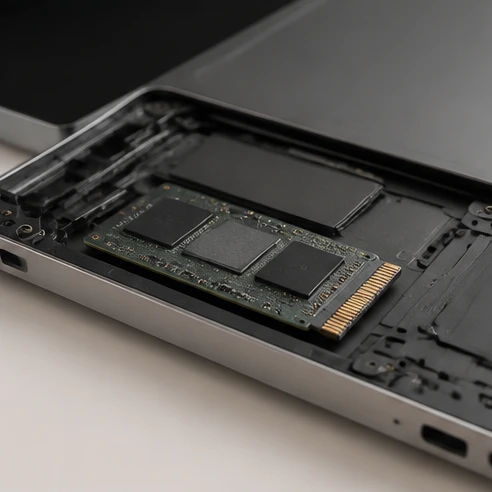
As a rough estimate for planning purposes rather than a measured figure, expect roughly 20 to 30 percent of a laptop’s advertised storage capacity to already be used by the operating system, preinstalled software, and any bundled Office suite before you save a single file of your own — so a laptop advertised with a smaller drive can run tight on space faster than the headline number suggests.
QVC listing checks before placing your order
Once you’ve settled on a bundle that matches both your software needs and your usage pattern, a short round of listing checks prevents the most common post-purchase surprises.
Start with the model number and full specification list, not just the marketing headline. QVC listings sometimes group several configurations of a similar-looking laptop under one product page, with the exact processor, RAM, and storage numbers only confirmed once you select a specific option. Read the confirmed configuration, not the range shown in the page title.
Cross-check the storage capacity, RAM amount, and processor model against the specification tables earlier in this guide, matching them to your actual use case rather than to whichever number looks biggest. A 15-inch touchscreen laptop with a strong processor is wasted money if your real need was portability and a smaller screen; the same is true in reverse for someone who wanted a work-from-home machine but ordered based on price alone.
Review what’s actually included in the box beyond the laptop itself. Some QVC laptop bundles add a case, a mouse, or extended coverage as part of a bundle price, and these extras can shift the comparative value of two otherwise similar listings.
Finally, check the return window and warranty terms before completing checkout, since laptop bundle contents, pricing, and promotional software offers on QVC are subject to change and should be confirmed against the live listing rather than assumed from a previous visit or a general impression of the brand. QVC’s standard return and warranty terms apply to electronics purchases, but the specific window and any manufacturer warranty details are listed on the product page itself and can vary by item.
- Confirm the exact laptop model and complete hardware specifications in the product listing.
- Verify the stated storage capacity, RAM amount, and processor model before checkout.
- Review the included accessories, bundle contents, and software details listed for the item.
- Check warranty coverage, return conditions, and available support information before ordering.
HP laptops, Lenovo laptops, and Microsoft-branded laptops each appear on QVC with different default software arrangements, so don’t assume brand alone tells you the Office license type. A Lenovo model and an HP model at a similar price point can carry entirely different Office bundles, which is exactly why the license-verification steps in this guide apply regardless of brand.
Before you close this tab, pick the one QVC listing that best matches the use case you identified earlier, open its full product description, and confirm the exact Microsoft Office product name and term length stated there — doing that one check now is what turns a guess into an informed purchase.
FAQ
Do laptops come preloaded with Microsoft Office?
Some laptops come with Microsoft Office offers included, but the type of access varies. A QVC laptop may include a Microsoft 365 subscription for a set term, a limited trial, or a one-time Office license. Check the listing details to confirm whether Word, Excel, and other apps are fully licensed and how long access lasts.
What type of Microsoft Office license is included with laptops?
The included license depends on the specific laptop bundle. Common options include a Microsoft 365 subscription for a defined period, a promotional trial, or a permanent Office license such as Office Home & Student. The exact product name and term should be listed in the laptop description or specifications.
Can you buy a laptop with Microsoft Office already installed?
Yes, some laptops are sold with Microsoft Office already included or installed, but the software arrangement can differ. A bundle may provide a Microsoft 365 subscription, a trial period, or a permanent Office license. Confirm the exact Office product and activation details before buying to avoid unexpected renewal costs.
Do Microsoft laptops come with Office?
A Microsoft-branded laptop does not automatically guarantee a full Office suite. Office availability depends on the specific product bundle and license included with that device. Buyers should check whether the listing names Microsoft 365, Office Home & Student, or another Office offer before assuming full editing access.
Do Lenovo laptops come with Microsoft Office?
Lenovo laptops can come with different software arrangements depending on the model and bundle. Some may include Microsoft Office offers, while others may not. The laptop brand alone does not confirm the Office license type, so checking the product listing for the exact software details is the most reliable approach.