
If you only have $400 to spend, you can still build a capable gaming PC — one that handles popular titles smoothly and lays the groundwork for future upgrades. While you won’t be pushing Cyberpunk 2077 at ultra settings, a well-chosen $400 gaming PC build will comfortably run games like Valorant, Minecraft, League of Legends, and Rocket League at 1080P with solid frame rates.
This guide covers the complete part list, expected performance, upgrade path, and everything else you need to know before pulling the trigger on your first budget gaming rig.
The Complete $400 Gaming PC Part List
Here’s the full build at a glance:
| Component | Part | Approx. Price |
|---|---|---|
| CPU | AMD Ryzen 5 5500 | ~$80 |
| Motherboard | ASRock A520M | ~$70 |
| GPU | Sparkle Intel Arc A380 | ~$90 |
| RAM | TEAMGROUP 16GB DDR4 3600MHz | ~$35 |
| SSD | KLEVV 512GB NVMe | ~$35 |
| Case | Cooler Master MasterBox Q300L | ~$45 |
| PSU | Thermaltake 650W Bronze | ~$55 |
Grand Total: ~$370–$430 (component prices fluctuate daily)
Pro tip: At this budget, it’s worth checking used markets like eBay, Craigslist, and Facebook Marketplace. You can get significantly more performance by buying quality used parts at the same price point.
Why This Combination Works
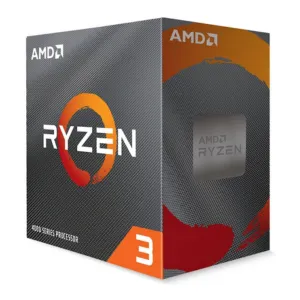
The heart of this build is the AMD Ryzen 5 5500 paired with the Intel Arc A380 GPU. Neither component is a powerhouse on its own, but together they form a competent entry-level 1080P gaming combo that punches above its price class.
The Arc A380 can run the vast majority of games at 1080P on at least low-to-medium settings, and handles less-demanding titles at maximum settings without breaking a sweat. Crucially, this part selection was made with upgradeability in mind — the build intentionally allocates budget to a better motherboard and PSU rather than squeezing every dollar into raw GPU performance right now.
Motherboard: ASRock A520M Phantom Gaming 4
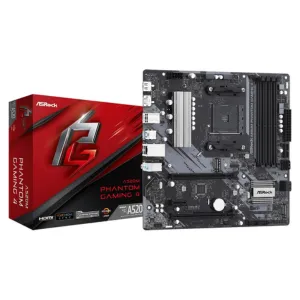
The ASRock A520M is a dependable micro-ATX board on the AM4 platform. It supports the entire Ryzen 5000 lineup, which means upgrading to a Ryzen 7 5700X3D later is as simple as a CPU swap — no new motherboard required. That kind of forward compatibility is rare at this price tier and makes the A520M one of the smartest choices in this build.
Power Supply: Thermaltake 650W Bronze
A 650W Bronze-rated PSU might seem overpowered for a $400 system, but it’s intentional. When you’re ready to upgrade your GPU to something like an RTX 3060, RX 6650 XT, or RX 7600, you won’t need to replace the power supply. That’s one less expense down the road.
Case: Cooler Master MasterBox Q300L
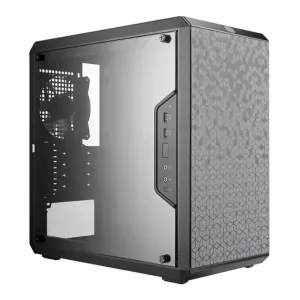
The Q300L is a compact, well-ventilated micro-ATX case that’s affordable without feeling cheap. It has enough room to fit this build comfortably and can accommodate a larger GPU when you upgrade.
What Kind of Gaming Performance Should You Expect?
This is one of the most common questions for first-time builders on a budget, so let’s be direct:
- eSports and less-demanding titles (Rocket League, League of Legends, Minecraft, Roblox, Valorant): expect 100+ FPS at 1080P on high settings
- Demanding AAA titles (Fortnite, Apex Legends, Call of Duty): expect 60+ FPS at 1080P on lower settings
You’ll be able to play virtually any game at 1080P — the trade-off on more demanding titles is that you’ll need to dial back settings. For competitive players focused on eSports titles, this build is more than sufficient and will deliver smooth, responsive gameplay.
Frequently Asked Questions
How Do I Actually Build This PC?
Assembling a PC from individual parts is more approachable than most people expect. Follow a step-by-step guide, take your time, and you’ll have it running in a few hours. Tech Guided’s How to Build a Gaming PC walkthrough covers the entire process from start to finish.
What About Windows?
Windows 11 costs around $125 for a retail activation key — which could push this build over budget. You have a few options:
- Install Windows 11 for free via Microsoft’s official download tool and leave it unactivated. It works fully; the only limitation is a small watermark on your desktop and some locked personalization settings. For most gamers, that’s a perfectly acceptable trade-off.
- Buy a third-party Windows key from platforms like Kinguin or G2A for around $30. There’s some risk involved, but many users have had success this way.
- Install a Linux distro (like Ubuntu or Pop!_OS) for free. Most major Steam titles now run on Linux via Proton, though some titles still lack support.
Can You Cut the Cost Further?
There’s not much fat left to trim on this build, but a few options exist:
- Drop to a lower-wattage PSU (though this limits future GPU upgrades)
- Shop the used market for GPU or CPU
- Check out the sub-$300 build for a less powerful but cheaper alternative
Avoid skimping on the power supply brand — a cheap, unbranded unit can damage other components.
The Upgrade Path: Turning This Into a Serious Gaming Rig
One of the best things about this $400 gaming PC build is how well it sets you up for incremental upgrades. Here’s the recommended upgrade order:
Step 1: Upgrade the GPU
This is the single biggest performance improvement you can make. The A520M motherboard and 650W PSU support all of the following mid-range options:
- AMD RX 6600 / RX 6650 XT
- AMD RX 7600 / RX 7600 XT
- NVIDIA RTX 3060
- Intel Arc A750
Any of these will allow you to max out virtually any game at 1080P. If you’re an NVIDIA user, pair a future GPU upgrade with a 144Hz G-Sync monitor for competitive titles. AMD GPU owners should look for FreeSync-compatible displays.
Step 2: Upgrade the CPU
The Ryzen 5 5500 is solid but not the long-term anchor of this system. The A520M supports the full Ryzen 5000 lineup, making the Ryzen 7 5700X3D an excellent second upgrade — especially with AMD’s 3D V-Cache technology delivering strong gaming performance at relatively affordable prices.
Step 3: Add More Storage
The 512GB NVMe SSD fills up faster than you’d expect once you start installing modern games. The A520M has one M.2 slot, so your options are to either swap the existing SSD for a larger one, or add a secondary SATA SSD in an available drive bay.
Final Verdict: A Smart $400 Entry-Level Build Worth Every Dollar
For gamers on a tight budget, a $400 gaming PC build remains one of the smartest investments you can make — especially when compared to similarly priced pre-built machines that often cut corners on PSU quality and upgradeability. This build delivers real 1080P gaming performance today while giving you a clear, cost-effective path to a high-end system tomorrow.
If your game library includes eSports titles and lighter games, you’ll be more than satisfied. If you’re eyeing AAA titles, you’ll get playable performance now with the foundation to upgrade when your budget allows.
Ready to build? Check the current component prices on Amazon and consider picking up used parts to stretch your budget even further.
References
- TechGuided – Best Budget Gaming PC Builds
- TechGuided – How to Build a Gaming PC: Step-by-Step
- TechGuided – Best PSU for Gaming PCs
- TechGuided – GPU vs CPU: What’s the Difference?
- Microsoft – Download Windows 11