
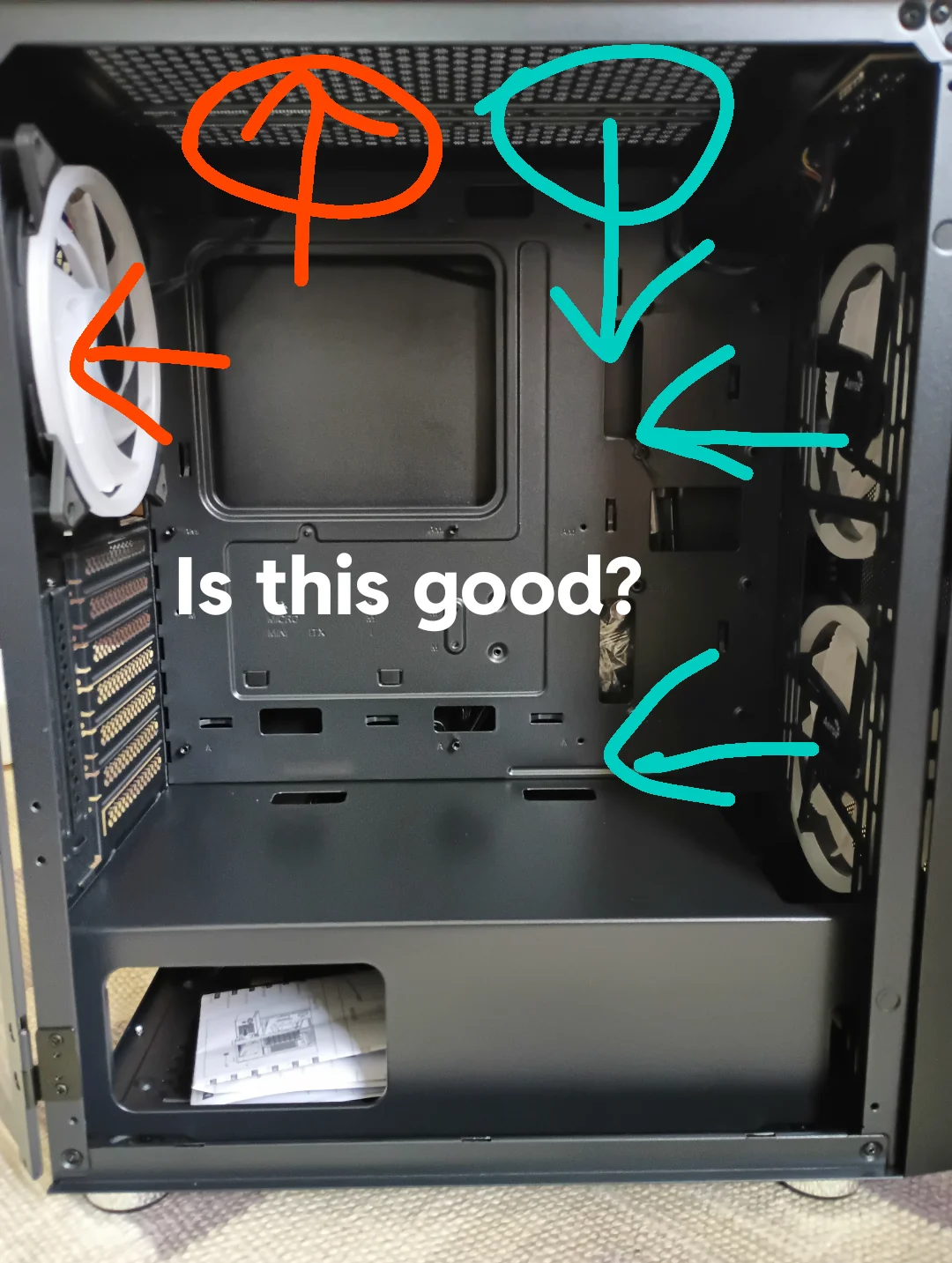
Choosing the right number of case fans is a critical, yet often overlooked, aspect of PC building. It’s not a one-size-fits-all answer, as your ideal fan count depends heavily on your specific setup, case size, and how you intend to use your computer. Understanding the principles of airflow and cooling is essential for maintaining a PC’s efficiency, performance, and longevity, especially during demanding tasks.
The Role of Case Fans
Case fans are the unsung heroes of PC thermals. Their primary function is to create a continuous cycle of air: drawing cooler ambient air into the computer chassis and expelling the warmer air generated by internal components. This active cooling prevents critical parts like the CPU, GPU, and storage drives from overheating, which can lead to performance throttling, instability, and premature component failure. Effective airflow is paramount for gaming, video editing, 3D rendering, and any intensive application.
Determining the Ideal Number of Fans
While the exact number of case fans required can vary, a fundamental setup typically includes at least two fans: one acting as an intake at the front of the case and another as an exhaust at the rear. This basic configuration establishes a foundational airflow path, helping to mitigate heat buildup. However, systems with higher heat output will benefit from additional fans. Here’s a guide based on usage:
- Basic Use and Office PCs: For everyday tasks such as web browsing, using office applications, and streaming media, the standard two-fan setup (one intake, one exhaust) is generally sufficient to maintain acceptable temperatures.
- Gaming and High-Performance PCs: Gaming rigs and workstations used for video editing or 3D rendering produce considerably more heat. For these demanding systems, three to five fans are recommended. This often translates to two intake fans at the front, one or two exhaust fans at the top, and one rear exhaust fan to ensure a consistent stream of cool air directed over the CPU and GPU.
- Enthusiast and Overclocked Systems: If you plan to overclock your CPU or GPU, or if your build includes multiple graphics cards, even greater cooling capacity is necessary. Five to six fans, or even more, can provide the essential airflow for these high-heat scenarios. This might include additional side or bottom intake fans and multiple top exhaust fans to create a robust cooling environment.
Factors to Consider
When deciding on the optimal number of case fans, several environmental and hardware factors come into play, each influencing the best cooling strategy for your PC.
Case Size
The dimensions of your PC case play a significant role in how air moves within it. Larger cases offer more internal volume, allowing air to circulate more freely, but they may necessitate more fans to ensure that cool air effectively reaches all components. Conversely, smaller cases have a more confined space, limiting the number of fans you can install. In these tighter environments, efficient cooling is even more critical to prevent heat from accumulating. Strategic fan placement and choosing the appropriate fan size are paramount for maximizing airflow in any case.
Component Heat Output
The specific components within your system and their thermal output are key determinants of your cooling requirements. High-performance parts, such as flagship gaming GPUs and overclocked CPUs, generate substantial amounts of heat. These components often demand not only increased airflow but also more directed cooling to maintain optimal operating temperatures. In such configurations, supplementary intake fans are vital for channeling cool air directly onto heat-generating parts, while exhaust fans are crucial for expelling the resultant warm air.
Ambient Temperature
The temperature of the room in which your PC operates cannot be ignored. A computer situated in a warmer environment will naturally run at higher temperatures, requiring enhanced cooling solutions to maintain stability. In warmer climates or during hot seasons, you may need to increase your system’s cooling capacity by adding more fans or opting for higher-performance cooling units.
Noise Levels
While increasing the number of fans can enhance cooling performance, it can also lead to a noticeable increase in system noise. This can be a significant drawback in quiet workspaces or home entertainment setups. Fortunately, advancements in fan technology have yielded models that offer both effective air movement and quiet operation. Look for fans with integrated speed controls, allowing you to adjust airflow and noise levels according to your preferences. Additionally, fans specifically designed for silent operation, often featuring specialized blade designs and anti-vibration mounts, can provide adequate cooling without significantly contributing to the ambient noise.
Tips for Optimal Airflow
Achieving an ideal thermal environment within your PC case involves more than simply adding as many fans as possible. Optimizing your setup for superior airflow and cooling performance requires a strategic approach.
Achieving Air Pressure Balance
Striving for a balanced or slightly positive air pressure setup is a key strategy. This involves ensuring that the number or speed of intake fans is slightly greater than exhaust fans. The objective is to create a gentle outward pressure that helps prevent dust from entering the case through unfiltered gaps and openings. Positive air pressure aids in minimizing dust accumulation, simplifying maintenance, and prolonging the lifespan of your components.
Consider Fan Placement
The correct placement of your fans is crucial for maximizing the effectiveness of your cooling system. Intake fans are most effective when positioned at the front and bottom of the case, where they can draw in the coolest available air. Exhaust fans, conversely, should be mounted at the rear and top of the case. This placement takes advantage of the natural tendency of warm air to rise, facilitating its efficient removal. This configuration ensures a continuous flow of cool air across your components, effectively dissipating heat.
Fine-Tuning Fan Speeds
Having the ability to control your fan speeds can profoundly impact your PC’s cooling efficiency and acoustic performance. Many modern motherboards provide software or BIOS options that allow for dynamic fan speed adjustments based on real-time system temperatures. This means your fans can operate at lower, quieter speeds during periods of light load and increase their speed as system temperatures rise under heavier workloads. Finding the right balance can keep your system cool without generating excessive noise.
Regular Maintenance
Consistent cleaning of your fans and air filters is essential for maintaining peak cooling performance. Dust and debris can accumulate rapidly, obstructing airflow and diminishing the efficiency of your fans. A clean system not only runs cooler but also operates more quietly, as the fans do not have to work as hard to move air. Establishing a regular cleaning schedule for your PC’s internal components ensures continued smooth and cool operation.
Conclusion
While there isn’t a universal “ideal” number of case fans, beginning with a standard configuration and adjusting based on your specific system’s thermal performance is a sensible approach. The ultimate goal is to cultivate a cool and stable operating environment for your PC’s components, thereby ensuring optimal performance and long-term reliability. For enthusiasts seeking to enhance their cooling capabilities, a diverse array of case fans is available to meet various needs, ranging from fundamental cooling solutions to high-performance, RGB-illuminated options that add aesthetic flair. Exploring these options can help you achieve the perfect synergy of cooling, performance, and visual appeal for your PC build.