
Gaming mice have reached a point where nearly every product from a reputable brand ships with a flawless sensor, and wireless tech has gone fully mainstream too. So how do manufacturers set themselves apart? Increasingly, the answer is latency. With the rise of 8000Hz gaming mice, the race for the fastest-responding mouse has become one of the most interesting battlegrounds in the peripherals market. Sure, the difference between the very top performers is barely noticeable in actual matches, but it’s still fascinating to see how far the technology has come.
This guide rounds up some of the fastest gaming mice available right now, along with a quick look at what makes each one tick. Keep in mind this isn’t an exhaustive list of every mouse on the market — new releases happen constantly, and as top-tier components become more accessible to more manufacturers, the pool of ultra-low-latency mice keeps growing.
Does Mouse Latency Actually Matter?
Short answer: yes, but only to a point. A mouse with high click or motion latency responds too slowly, meaning your physical movements don’t translate into in-game action fast enough for consistent performance. Ideally, you want input registered almost instantly. Hardware limitations make true instant response impossible, but modern sensors are getting remarkably close.
In terms of numbers, anything under 5ms — which covers every mouse on this list — is considered top tier, while sub-2ms response times sit at the cutting edge. Realistically, a human can’t reliably feel the difference between mice in the 1ms–10ms range. As sensor tech keeps improving, mice well above 10ms are becoming rarer, though anything up to 15ms is still perfectly usable. Beyond that, lag starts becoming noticeable.
The takeaway: latency matters, but mostly as a baseline check rather than a deciding factor. Once a mouse falls within acceptable parameters, things like shape and comfort matter far more when picking the right gaming mouse for you. Still, it’s encouraging to see latency optimization becoming a priority across the entire peripherals market.
When it comes to latency, anything under 5ms is considered top tier, with sub-2ms response times representing the current cutting edge.
NVIDIA Reflex and the Push for Lower Latency
Companies like NVIDIA have invested heavily in reducing in-game latency, and platforms like NVIDIA Reflex let players analyze and optimize their entire system’s responsiveness. With Reflex, players can measure latency across their full setup — assuming they have compatible peripherals and components, since high refresh-rate monitors are also a key part of any latency-optimized build. Developers, meanwhile, can integrate Reflex technology directly into their games to cut down player-side latency.
Reflex is showing up in more peripherals and more titles all the time, including an upcoming integration into Counter-Strike 2. The fight against latency is only getting more intense as adoption spreads.
Wireless vs. Wired: Does It Still Matter?
Different brands rely on different wireless protocols, but as this list shows, a mouse like the Logitech G Pro X Superlight — an older wireless model running at “just” 1000Hz — still competes with the very best. The idea that wireless mice are automatically inferior to wired ones is well and truly outdated.
8000Hz vs. 4000Hz vs. 1000Hz Polling Rates
A higher polling rate can lead to lower response times — though implementation matters just as much as the raw number. Generally speaking, mice with 4000Hz or 8000Hz polling rates tend to perform better in terms of overall latency. The logic is straightforward: an 8000Hz mouse sends eight times as much positional data to the PC every second compared to a 1000Hz mouse, so shorter intervals between updates typically mean quicker in-game response.
ASUS ROG Chakram X — 0.2ms (Wired, 8KHz)
NVIDIA Reflex Compatible
The ASUS ROG Chakram X is loaded with tech both inside and out. It runs the brand’s AimPoint sensor at a flawless 8000Hz and supports three connection modes: Bluetooth, 2.4GHz wireless, and a wired connection. Optical switches round out the responsiveness package.
What makes the Chakram X stand out is its set of genuinely unique features. The main switches are hot-swappable — a rarity in gaming mice and a genuinely valuable feature, since faulty switches are often the first thing to fail on a mouse. Being hot-swappable means you can replace a broken switch easily, or simply swap in a different switch type to match your personal preference.
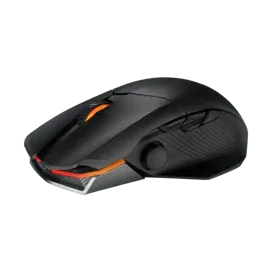
The Chakram X also adds extra input options most mice skip entirely: four side buttons instead of the usual two, plus a programmable joystick on the side that can function in analog mode, similar to a console controller stick. Battery life clocks in at 114 hours, and it’s Qi-compatible for wireless charging. All these extras push the weight up to 127 grams, which is on the heavier side, but if you’re after a feature-packed mouse with serious configurability, the Chakram X earns its spot.
Pros: Excellent response time and gaming performance; long battery life; hot-swappable switches; tons of extra buttons and features
Cons: Heavy; side button placement isn’t ideal; relatively expensive
| Spec | Detail |
|---|---|
| Sensor | ROG AimPoint |
| DPI | 100–26,000 (steps of 100) |
| Polling Rate | 125 / 500 / 1000 / 2000 / 4000 / 8000 Hz |
| Switches | ROG Micro Switches |
| Connection | Wireless |
| Shape | Ergonomic |
| Weight | 128 g |
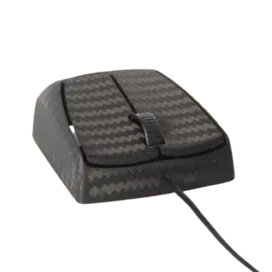
Zaunkoenig M2K — 0.3ms (Wired, 8KHz)
If the Chakram X is a feature-loaded luxury car, the Zaunkoenig M2K is a stripped-down drag racer. There isn’t much to describe here because there isn’t much to the mouse — and that’s entirely intentional. Handmade from carbon fiber, it weighs just 24 grams, has no side buttons, and connects only via cable. Its shape leans heavily toward fingertip grip, making it a highly specialized product aimed at a very narrow slice of the market.
It’s a niche mouse, but a respectable one. For players chasing the lightest possible mouse and using a fingertip grip, this could be the ultimate pick.
Pros: Extremely lightweight; very responsive feel; flawless sensor performance; great coating
Cons: Buttons feel slightly mushy; wired only; expensive
| Spec | Detail |
|---|---|
| Sensor | PMW 3360 |
| DPI | 12,000 |
| Polling Rate | 1000 / 2000 / 4000 / 8000 Hz |
| Switches | Omron |
| Connection | Wired |
| Shape | Ambidextrous |
| Weight | 24 g |
Razer DeathAdder V3 Pro — 0.5ms (Wireless, 4KHz)
Razer’s redesign of its iconic DeathAdder line has been a hit, partly thanks to a shape update that made the mouse more accessible to a wider range of grips. Under the hood, the DeathAdder V3 Pro (often shortened to “DAV3” by enthusiasts) packs Razer’s Focus Pro 30K Optical sensor alongside third-generation Optical switches, putting it firmly among the fastest-responding mice available.
With a separate wireless dongle (sold separately, unfortunately), the DAV3 Pro can hit 4000Hz polling in wireless mode — one of the highest wireless polling rates on the market today.
Pros: Excellent build quality; flawless wireless connection; strong 90-hour battery life; 4KHz wireless polling (with dongle); great-feeling Gen 3 optical switches
Cons: High price; side buttons have noticeable post-travel; shape change won’t suit everyone; 4KHz isn’t available out of the box
| Spec | Detail |
|---|---|
| Sensor | Focus Pro 30K |
| DPI | 100–30,000 (steps of 50) |
| Polling Rate | 125 / 500 / 1000 / 4000 Hz |
| Switches | Razer Optical |
| Connection | Wireless |
| Shape | Ergonomic |
| Weight | 63 g |
Corsair Sabre RGB Pro — 0.6ms (Wired, 8KHz)
NVIDIA Reflex Compatible
Corsair isn’t typically the first brand gamers think of for mice, but the Sabre RGB Pro proves the company knows exactly what it’s doing. This ergonomic mouse weighs 74 grams (69 grams for the RGB-free version) and packs top-tier internals that make it one of the most responsive options around.
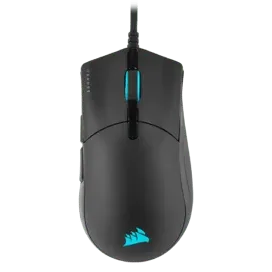
What really sets this mouse apart is its price. It’s frequently found on sale for as low as $30, which is a bargain for a mouse with this level of internal hardware. Add a comfortable, no-frills ergonomic shape and solid build quality, and the Sabre RGB Pro becomes a strong pick for anyone hunting for high-end specs on a budget.
Pros: Strong gaming performance; satisfying clicks; 8000Hz polling rate; solid build quality
Cons: Feet quality is mediocre; cable is fairly thick
| Spec | Detail |
|---|---|
| Sensor | PMW 3392 |
| DPI | 100–18,000 (steps of 100) |
| Polling Rate | 125 / 500 / 1000 / 2000 / 4000 / 8000 Hz |
| Switches | Omron |
| Connection | Wired |
| Shape | Ergonomic |
| Weight | 74 g |
Razer Viper 8KHz — 0.7ms (Wired, 8KHz)
There are several versions of the Razer Viper, but for outright speed, the wired 8KHz model is the one to grab. It was among the very first gaming mice to launch with 8000Hz polling, generating plenty of buzz when it first hit the market.
Beyond the headline polling rate, the Viper 8KHz is a genuinely well-rounded mouse — pleasant clicks, a safe ambidextrous shape, and a flawless sensor. If you want an 8KHz-capable mouse from a major brand without a niche shape, this is a solid choice.
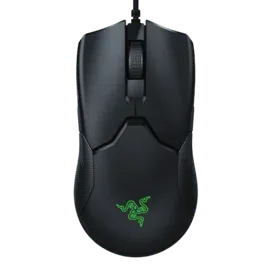 Razer Viper 8KHz wired ambidextrous gaming mouse with optical switches
Pros: Excellent gaming performance; solid build quality; 8000Hz polling rate
Cons: Cable is thick and somewhat stiff
| Spec | Detail |
|---|---|
| Sensor | Focus+ |
| DPI | 100–20,000 (steps of 50) |
| Polling Rate | 1000 / 2000 / 4000 / 8000 Hz |
| Switches | Razer Optical |
| Connection | Wired |
| Shape | Ambidextrous |
| Weight | 71 g |
EVGA X17 — 0.7ms (Wired, 8KHz)
NVIDIA Reflex Compatible
The EVGA X17 doesn’t have the brand recognition of the others on this list, but it’s a genuinely impressive piece of engineering. It uses a triple-sensor array, with two sensors dedicated to fine-tuning lift-off distance (LOD) and a third handling tracking at polling rates up to 8KHz.
Extra features include a “sniper button” that lowers DPI on press for more precise aiming, plus a tilting scroll wheel for additional inputs. With its built-in thumb rest and heavier build, the X17 fits into that comfort-focused category alongside mice like the G502 or Basilisk — ideal for players who prefer a heftier mouse with extra support.
Pros: Solid build quality; great gaming performance; extra scroll wheel inputs
Cons: Thick, stiff cable; on the heavier side
| Spec | Detail |
|---|---|
| Sensor | PMW 3389 |
| DPI | 50–16,000 (steps of 50) |
| Polling Rate | 125 / 250 / 500 / 1000 / 2000 / 4000 / 8000 Hz |
| Switches | Omron |
| Connection | Wired |
| Shape | Ergonomic |
| Weight | 103 g |
Logitech G Pro X Superlight — 0.8ms (Wireless, 1KHz)
NVIDIA Reflex Compatible
Logitech has long understood what makes a great gaming mouse, and the dominance of the G Pro line — the G Pro Wireless and Superlight especially — in professional gaming circles speaks for itself. The level of optimization packed into these mice is remarkable.
What’s especially impressive is how well the Superlight holds up. Despite being a wireless mouse running at “only” 1000Hz and having launched years ago, it remains among the most responsive gaming mice available today. That kind of staying power is rare in tech.
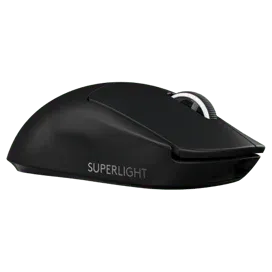
It’s no surprise professional players adopted this mouse in droves and have been slow to switch to newer alternatives — the Superlight still competes hard against much newer hardware on pure performance.
Pros: Fits most hand sizes and grip styles; good battery life; flawless wireless performance; lightweight
Cons: Micro USB charging port; higher price point
| Spec | Detail |
|---|---|
| Sensor | HERO |
| DPI | 100–25,600 (steps of 50) |
| Polling Rate | 125 / 250 / 500 / 1000 Hz |
| Switches | Omron |
| Connection | Wireless |
| Shape | Ambidextrous |
| Weight | 62 g |
Logitech G303 Shroud Edition — 0.8ms (Wireless, 1KHz)
NVIDIA Reflex Compatible
Logitech’s wireless tech shines again here. The G303 Shroud Edition is an updated take on the original G303, a mouse that built a cult following partly because former Counter-Strike: Global Offensive pro and popular streamer Shroud used it for years.
This newer version runs slightly larger than the original, so longtime fans hoping for an exact shape match should adjust expectations. Otherwise, it’s a fantastic modern revival of a beloved classic. Its shape leans toward a specific style of claw grip, so players wanting a more universally “safe” shape may want to look elsewhere.
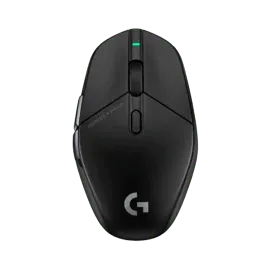 Logitech G303 Shroud Edition wireless gaming mouse designed for claw grip players
Pros: Strong build quality; flawless wireless performance; great battery life; specialized shape suits claw grip well
Cons: That same specialized shape limits it for other grip types; Omron switches may feel dated to some
| Spec | Detail |
|---|---|
| Sensor | HERO |
| DPI | 100–25,600 (steps of 50) |
| Polling Rate | 125 / 250 / 500 / 1000 Hz |
| Switches | Omron |
| Connection | Wireless |
| Shape | Ambidextrous |
| Weight | 75 g |
Endgame Gear XM1r — 0.9ms (Wired, 1KHz)
Endgame Gear is a relatively new name in peripherals, but the XM1 series made waves quickly, and the XM1r remains the flagship wired model in that lineup. It pairs a well-implemented PMW 3370 sensor with Kailh GM 8.0 switches — strong specs on their own, though a 1000Hz polling rate wouldn’t typically scream “ultra-fast” at first glance.
That’s exactly why the XM1r is such a good case study: implementation matters as much as raw numbers. Despite the “standard” polling rate, it remains one of the most responsive mice available, backed by excellent build quality and a claw grip-friendly shape that’s earned it a strong following among enthusiasts.
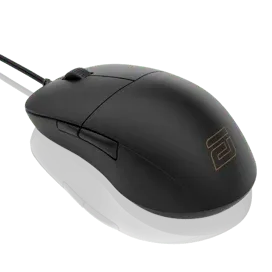
Pros: Great shape; excellent build quality; strong gaming performance
Cons: Feet quality could be better
| Spec | Detail |
|---|---|
| Sensor | PMW 3370 |
| DPI | 400–3,200 (steps of 100) |
| Polling Rate | 125 / 500 / 1000 Hz |
| Switches | Kailh GM 8.0 |
| Connection | Wired |
| Shape | Ambidextrous |
| Weight | 70 g |
Roccat Kone Pro Air — 1.2ms (Wireless, 1KHz)
NVIDIA Reflex Compatible
The Roccat Kone Pro Air represents one of the brand’s flagship efforts. At 75 grams, it features Titan Optical switches paired with Roccat’s Owl-Eye 19K DPI sensor.
This ergonomic mouse connects via a smooth, lag-free wireless link, and the overall tuning is excellent, placing it among the most responsive mice on this list. Battery life exceeds 100 hours, with support for both Bluetooth and 2.4GHz connections, and just 10 minutes of charging delivers around 5 hours of play.
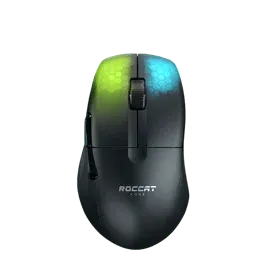 Roccat Kone Pro Air ergonomic wireless gaming mouse with Titan Optical switches
Pros: Great gaming performance; comfortable shape; interesting lighting effects; solid build quality
Cons: No wireless extender included
| Spec | Detail |
|---|---|
| Sensor | PMW 3370 |
| DPI | 200–19,000 (steps of 100) |
| Polling Rate | 125 / 250 / 500 / 1000 Hz |
| Switches | Optical Switches |
| Connection | Wireless |
| Shape | Ergonomic |
| Weight | 75 g |
Final Thoughts on the Fastest Gaming Mice
If you follow competitive gaming even casually, a few entries on this list might come as a surprise. It’s genuinely encouraging to see state-of-the-art mouse technology spreading across the industry, including brands not typically associated with esports-grade peripherals. More viable options is always better for gamers than fewer.
Every mouse covered here ranks among the best for responsiveness and overall gaming performance, so if you’re chasing every possible edge, any of these picks will deliver. That said, diminishing returns are very real here — the latency gaps between these mice are far too small for a human to consistently notice, and anything under 10ms is genuinely difficult to distinguish in practice.
Ultimately, the “best” choice depends less on shaving off another fraction of a millisecond and more on finding a shape, weight, and connection type that actually suits your grip and play style. Use this list as a shortlist of proven, low-latency options, then narrow it down based on comfort and fit. Got questions about any of these mice or want a deeper comparison? Drop a comment below.
References
- ProSettings, “High Polling Rate Mouse Guide,” prosettings.net
- ProSettings, “What is NVIDIA Reflex?,” prosettings.net
- ProSettings, “How to Choose the Right Gaming Mouse for You,” prosettings.net
- ProSettings, “60Hz vs 144Hz vs 240Hz,” prosettings.net
- ProSettings, Individual mouse reviews (Zaunkoenig M2K, Razer Viper 8KHz, Logitech G Pro X Superlight, Logitech G303 Shroud Edition, Endgame Gear XM1r), prosettings.net