
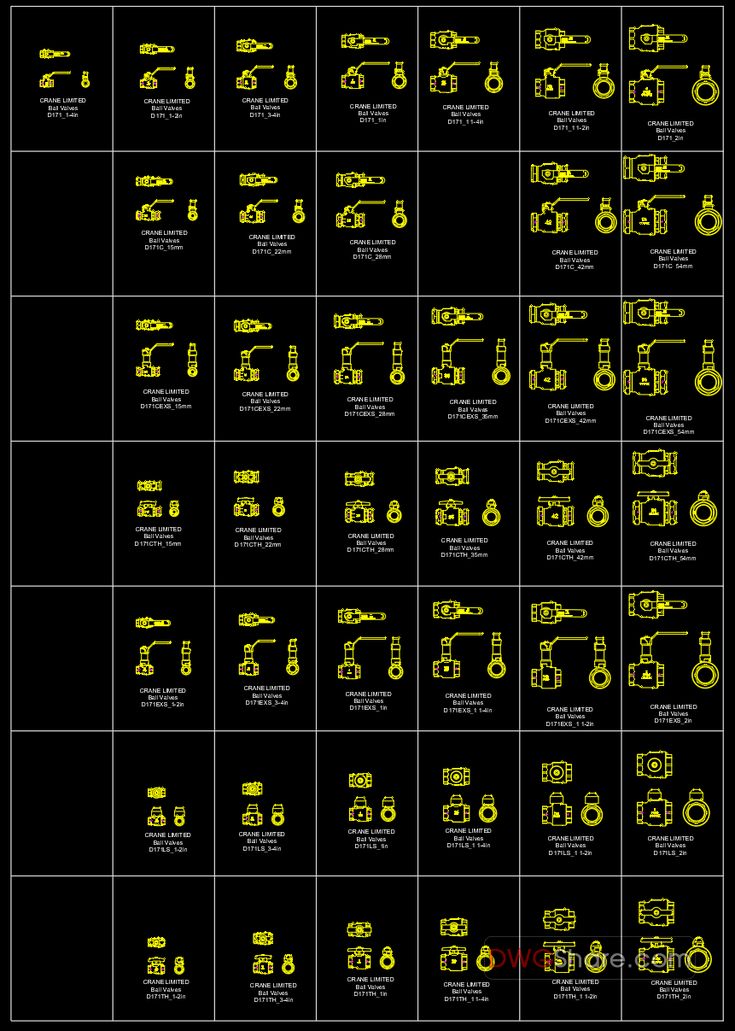
A reliable library of check valve CAD blocks is fundamental for accurate and efficient design in plumbing, HVAC, fire protection, and industrial piping projects. Check valves play a critical role in preventing backflow, safeguarding pumps and other vital equipment, and ensuring the stable operation of fluid systems. By utilizing a well-organized check valve CAD block DWG set, engineers and CAD designers can rapidly insert appropriate symbols, maintain uniformity across design documents, and significantly reduce coordination errors between Process and Instrumentation Diagrams (P&IDs) and detailed piping layouts. This guide explores the function of check valves, common CAD block types, and best practices for their implementation in AutoCAD.
Understanding the Role of Check Valves in Piping Systems
At its core, a check valve is a non-return device designed to permit fluid flow in only one direction while automatically closing to prevent reversal when the flow direction changes. The accurate representation of these valves in design drawings, through the use of correct check valve CAD blocks, is crucial for effectively communicating key design information. This includes:
- Valve Type: Clearly indicating whether it’s a swing, wafer, or inline type.
- End Connection: Specifying the type of connection, such as flanged or screwed/threaded.
- Size and Orientation: Detailing the valve’s size range and its intended installation orientation.
- Maintenance and Accessibility: Communicating any specific requirements for maintenance access.
Precise representation is vital because different types of check valves exhibit distinct operational characteristics under varying conditions, such as low flow rates, system pulsations, and vertical installations.
Common Check Valve CAD Block Types in DWG Libraries
A comprehensive check valve CAD block DWG package typically encompasses a variety of styles and material options to cater to diverse applications.
Swing Check Valve (Flanged)
Flanged swing check valves are frequently specified for larger pipe diameters and are commonly found in mechanical plant rooms. Their typical applications include:
- Discharge lines from pumps.
- Chilled water and condenser water systems.
- Utility headers.
Standard DWG blocks for these valves usually provide both elevation and plan views, featuring distinct flange ends for precise spatial coordination.
Swing Check Valve (Screwed / Threaded)
For smaller diameter piping systems, screwed swing check valves are a popular choice, often utilized in:
- Branch lines for domestic water systems.
- Small-scale HVAC water services.
- Connections for equipment and auxiliary piping.
Symbols for threaded valves are typically more compact, making them suitable for installations in confined mechanical spaces.
Wafer Check Valve
Wafer check valves are designed to be installed between pipe flanges, offering a lightweight and space-saving solution. They are commonly selected in scenarios where:
- Installation space is a significant constraint.
- Reducing the overall weight of the piping assembly is a priority.
- Quick and efficient installation between flanged pipe sections is desired.
Within a DWG library, wafer check valve blocks should clearly depict their characteristic thin body profile in elevation views.
Bronze and Iron Check Valve Symbols
Many projects differentiate valve components based on material, and check valves are no exception:
- Bronze check valves are commonly used in smaller domestic water service lines.
- Iron (or ductile iron) check valves are typically specified for larger HVAC and utility system applications.
Even if a drawing is schematic in nature, maintaining separate block naming conventions for different materials aids in aligning the design documentation with project specifications.
Best Practices for Placing Check Valve CAD Blocks in AutoCAD
Adhering to best practices ensures clarity, consistency, and accuracy in your piping designs.
Align with Flow Direction and System Intent
It is imperative to always confirm the intended flow direction from the P&ID and place the check valve CAD block accordingly. For pump discharge lines, the valve’s placement should facilitate effective pump protection and ensure adequate maintenance access.
Maintain Consistent Symbol Style Across Sheets
For P&IDs and general design layouts, it’s advisable to use simplified symbols. However, if project standards dictate, more detailed blocks can be employed for shop drawings. Inconsistent symbol styles across different drawing types can lead to confusion for contractors and reviewers.
Utilize Clear Naming and Size Labeling
For CAD block libraries, especially those provided by DWG library websites, consistent naming conventions greatly enhance usability. Examples of effective naming include:
CheckValve_Swing_Flanged_DN150CheckValve_Wafer_DN100CheckValve_Swing_Screwed_1in
This systematic approach allows users to quickly select the correct valve without needing to perform manual resizing operations.
Applications Where Check Valve DWG Blocks Are Most Beneficial
A robust check valve CAD block DWG library significantly streamlines the design process and enhances documentation quality in numerous applications, including:
- Pump discharge systems and booster sets.
- Chilled water and condenser water piping networks.
- Domestic water risers and distribution branches.
- Fire pump and service connections (as per project specifications).
- Tie-ins for utility and process piping.
Ultimately, a well-constructed check valve CAD block DWG library not only accelerates drawing production but also helps mitigate design errors related to reverse flow and ensures consistent valve representation throughout your AutoCAD piping documentation.