
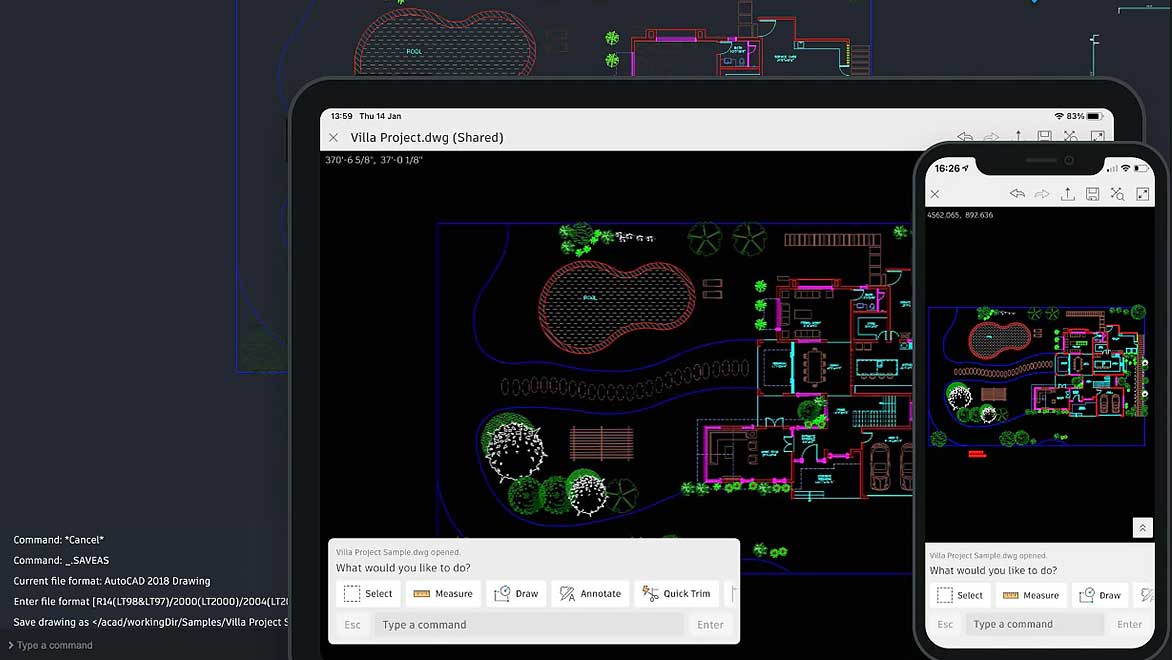
The world of design is increasingly mobile and collaborative, and Autodesk’s AutoCAD Web and Mobile apps are at the forefront of this evolution. Whether you’re a seasoned CAD professional or a budding designer, these tools offer unparalleled flexibility to access, edit, and share your DWG files from virtually anywhere. This article delves into the capabilities of AutoCAD Web and Mobile, highlighting how they empower users to streamline their workflows and enhance collaboration.
Seamless Access and Editing Across Devices
Autodesk’s commitment to accessibility is evident in the robust features of its web and mobile platforms. Gone are the days of being tethered to a desktop workstation for critical design tasks. With AutoCAD Web, you can simply sign in from your web browser and immediately begin editing, creating, sharing, and viewing CAD drawings. This seamless integration extends to your mobile device through the AutoCAD Mobile app, allowing you to bring your designs wherever you go.
Collaborate Anywhere with Cloud Integration
The power of AutoCAD Web is amplified by its flexible cloud platform integration. You can effortlessly open 2D or 3D DWG files directly from various cloud storage services, including Autodesk Drive, Autodesk Docs, Microsoft OneDrive, Box, Dropbox, and Google Drive. This broad compatibility ensures that your project files are always within reach, facilitating real-time collaboration and reducing the friction often associated with file sharing.
Work Offline and Sync with Ease
Understanding the unpredictable nature of fieldwork and on-the-go design, AutoCAD on mobile offers a crucial “work offline and sync later” feature. This functionality allows you to access and make edits to your CAD drawings even when you don’t have an internet connection. Once you’re back in the office or at home with connectivity, the app syncs your changes seamlessly, ensuring your work is always up-to-date.
Key Features for Enhanced Collaboration
Autodesk has packed its web and mobile applications with features designed to foster efficient collaboration and streamline design processes.
Multi-User Markup
The Multi-User Markup feature allows multiple users to provide simultaneous access to designs through markup links. This innovative approach eliminates the need for duplicating or locking files, preventing version control issues and promoting concurrent feedback.
Trace
With the Trace feature, collaborators can review and add feedback directly onto a drawing without altering the original design. This maintains the integrity of the existing drawing while providing a clear channel for suggestions and revisions.
Local File Access
The Local File Access feature empowers users to work directly with DWG files stored on their local drives or LAN. Edits made are applied directly without the need for creating cloud duplicates, simplifying file management for local projects.
Sheet Set Manager
The Sheet Set Manager facilitates seamless transfer of sheet sets between teammates. Accessing these sets quickly and securely through Autodesk’s cloud platform ensures that everyone is working with the latest approved documentation.
Editable Blocks
Users can create and modify blocks directly within the web and mobile environments. This feature also provides access to block libraries, enhancing efficiency in repetitive design elements.
Flexible Layers
The ability to create and organize layers with flexibility and control is crucial for managing complex drawings. AutoCAD Web and Mobile support this fundamental CAD functionality.
Accessibility and Subscription Information
Autodesk AutoCAD Web, formerly known as the AutoCAD Web app and AutoCAD Mobile app, is designed to provide access to core AutoCAD commands for light editing, fundamental design creation, and collaboration. It allows users to add change notes and markups without altering existing desktop drawings and access CAD files in the cloud.
These powerful web and mobile applications are included with every AutoCAD or AutoCAD LT subscription, making them an invaluable part of your Autodesk software suite. Whether you’re looking to view, edit, or create fundamental designs on the go, these tools offer an accessible and efficient solution.
For a more in-depth understanding of the functionalities and features, consult the full FAQ on Autodesk’s help portal.