
In the competitive landscape of Computer-Aided Design (CAD) software, two prominent names often emerge: AutoCAD and SolidWorks. While both are powerful tools, they cater to distinct needs and user preferences. This comprehensive comparison delves into the core functionalities, strengths, and weaknesses of each, helping you determine which software is the better choice for your specific requirements in 2023. Understanding the nuances between AutoCAD and SolidWorks is crucial for professionals and hobbyists alike to make an informed decision that aligns with their project goals and budget.
AutoCAD, developed by Autodesk, is a long-standing industry standard known for its versatility in both 2D drafting and 3D modeling. On the other hand, SolidWorks, owned by Dassault Systems, has carved a niche for itself with its robust 3D modeling capabilities and simulation features, particularly favored in mechanical engineering and product design. This article will dissect their user interfaces, drafting tools, deliverable formats, pricing structures, and community support to provide a clear verdict.
Quick Verdict
AutoCAD and SolidWorks are both highly capable CAD tools, but their optimal use cases differ significantly. AutoCAD excels as a general-purpose software for a wide array of 2D and 3D drafting tasks across various industries. Conversely, SolidWorks shines when it comes to intricate 3D model creation, advanced simulations, and product development. The “better” software is entirely subjective and depends on your specific project demands. If your focus is broad drafting applications, AutoCAD might be the more suitable choice. However, if your work involves detailed 3D part design and physics simulation, SolidWorks is likely the superior option. It’s also important to note that this comparison primarily focuses on AutoCAD, not Autodesk’s Inventor, which offers a more direct comparison to SolidWorks.
Comparison at a Glance
| Criteria | SolidWorks | AutoCAD | Notes |
|---|---|---|---|
| UI & Tools | Winner | N/A | SolidWorks offers more advanced 3D capabilities and specialized tools. |
| 2D Drafting | N/A | Winner | AutoCAD’s traditional drafting approach is better suited for 2D work. |
| Deliverables | Depends | Depends | Varies based on project needs (e.g., STL files, blueprints, DWG files). |
| Price | Depends | Depends | Both have varied pricing models, with student versions and subscriptions. |
| Viewing Apps | Tie | Tie | Both provide free viewing applications for sharing designs. |
| Mobile Apps | Tie | Tie | Both offer mobile apps for on-the-go access and minor edits. |
| Community | Winner | N/A | SolidWorks has a more active and engaged independent drafting community. |
| Training | Tie | Tie | Abundant training resources are available for both platforms. |
In-Depth Considerations
1. User Interface (UI) and Tools (3D Modeling)
Winner: SolidWorks
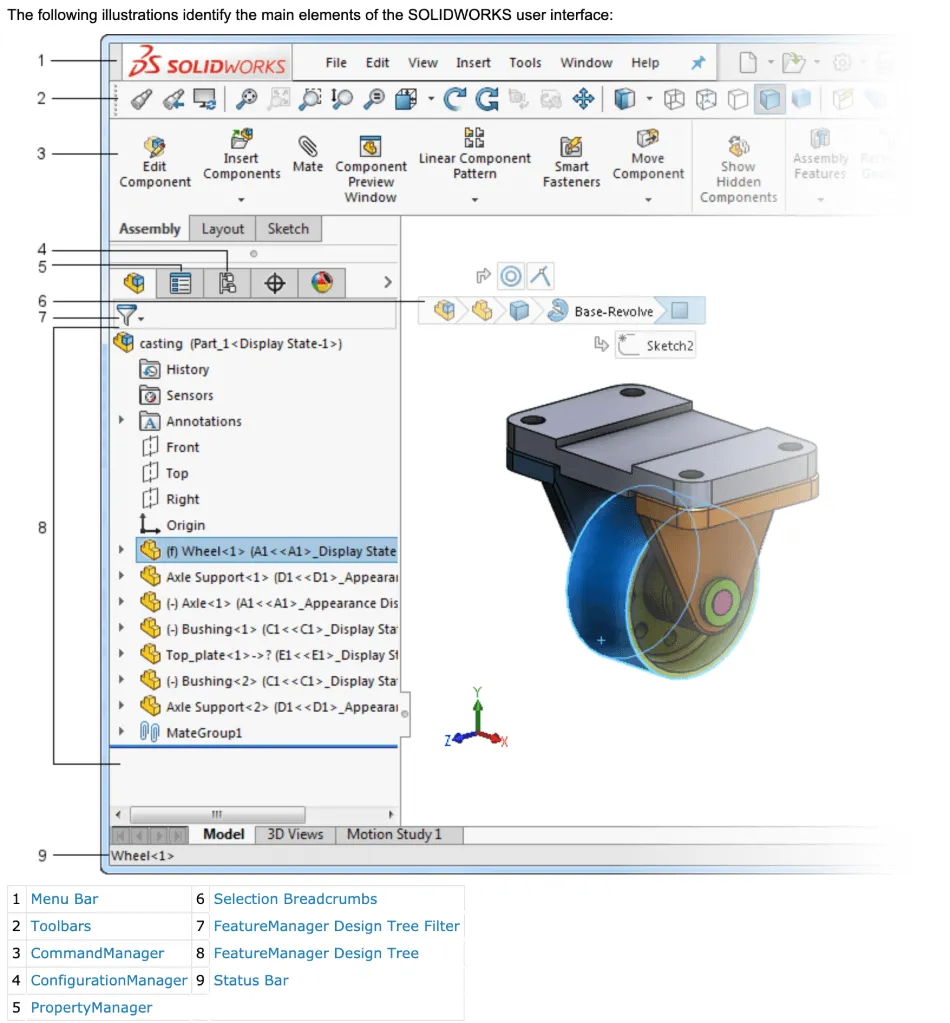
AutoCAD possesses strong 3D modeling capabilities, allowing users to create complex parts using its classic, command-line-driven interface. Many users appreciate the efficiency of keyboard shortcuts, which keep the cursor focused on the design area without constant toolbar navigation. While AutoCAD can model virtually anything in 3D, SolidWorks is specifically engineered with numerous features tailored for machinists and product developers. Its innovative approach and specialized tools make it the frontrunner in this category for intricate 3D design.
Related Links
- CATIA vs Solidworks | Head-to-Head Comparison (2023)
- Solid Edge Vs SolidWorks: Head-to-Head Comparison (2023)
2. 2D Drafting
Winner: AutoCAD
While SolidWorks can produce 2D drawings, it is not optimized for this purpose. Architectural, civil engineering, and construction draftsmen will find that AutoCAD’s dedicated 2D drafting environment is far more efficient and suitable for their needs, handling tasks like floor plans and detailed sections with greater ease.
3. Deliverables
Winner: Depends
The “deliverable” refers to the final output of your CAD work, which varies based on the project’s objective.
- 3D Printing Files (STL): Both SolidWorks and AutoCAD can export STL files. The success of the print largely depends on the quality of the 3D model itself.
- 3D Assemblies: SolidWorks is superior for creating assemblies due to its “mate” functions, which allow for precise positioning and constraints between parts. It even supports physics simulations to animate moving parts. AutoCAD can assemble 3D objects but lacks these advanced relational functionalities.
- Printable Sheet Sets: For creating blueprints and technical drawings for manufacturing or construction, AutoCAD traditionally holds an edge. However, SolidWorks offers features like the “explode line” tool, which visually demonstrates how parts fit together, making complex assemblies easier to understand on printed pages.
- 3D Simulations: AutoCAD does not offer simulation capabilities. SolidWorks, on the other hand, can perform simulations for mechanical operations, fluid dynamics, and environmental impact analysis.
4. Price
Winner: It Depends
Pricing for both software packages can be complex and varies significantly based on the version and subscription model.
| Product | Regular Price | Discounted Price |
|---|---|---|
| AutoCAD | $1,690/year | Check here |
| SolidWorks | $3995 license + $1295/year | No Discount |
| Autodesk Deals & Packages | Varies | Check here |
- Free Trials: Both AutoCAD and SolidWorks offer 30-day free trials.
- Student Editions: SolidWorks offers a student version for $150/year, while Autodesk products, including AutoCAD, are free for students and educators (with proof of eligibility).
- Limited Versions: AutoCAD LT is a more affordable option for users who do not require 3D modeling capabilities, costing around $420/year.
- Standard Subscriptions: AutoCAD’s standard annual subscription is approximately $1600/year. SolidWorks requires a one-time license purchase of $3995 plus an annual subscription fee of $1295/year for updates and support.
- Professional/Premium Editions: SolidWorks offers Professional and Premium versions with advanced features like rendering, simulation, and cost estimation, at higher price points. Autodesk offers specialized toolsets for various industries (e.g., Plant 3D, Mechanical) rather than a direct “professional” equivalent to SolidWorks’ higher tiers.
- Bulk Licenses: Discounts are available for bulk purchases from both companies.
5. Viewing Apps
Winner: Tie (though arguably more useful for SolidWorks)
Both companies provide free viewing apps. While AutoCAD drawings are often shared as PDFs for clients, SolidWorks’ viewing apps are more beneficial for showcasing interactive 3D models, simulations, and allowing clients to visualize designs like opening drawers or running engines.
6. Mobile Apps
Winner: Tie
Both AutoCAD and SolidWorks offer mobile applications that allow users to view and make minor modifications to drawings on smartphones or tablets. This can be invaluable for field work or urgent on-site adjustments.
7. Community
Winner: SolidWorks
SolidWorks appears to have a more vibrant and engaged independent community. YouTube tutorials, shared content, and user-generated resources are abundant, fostering a collaborative environment for learning and inspiration.
8. Training
Winner: Tie
Comprehensive training resources are readily available for both AutoCAD and SolidWorks, whether through official channels or independent online platforms.
Final Thoughts
When considering CAD software, it’s essential to understand that AutoCAD and SolidWorks are not directly comparable in all aspects. A more accurate comparison for SolidWorks would be with Autodesk Inventor.
SolidWorks and Inventor: Next-Generation 3D Modeling
Developed in 1982, AutoCAD has evolved significantly but originated from a 2D drafting paradigm. SolidWorks, released in 1993, was built with 3D modeling and product design in mind. Both software packages continue to adapt, but SolidWorks and Inventor are often at the forefront of intuitive and creative 3D design technology.
Avoid a Career Ceiling with AutoCAD
While AutoCAD offers specialized toolsets, its core development might not evolve as rapidly in the 3D space compared to dedicated 3D modeling software like SolidWorks or Inventor. Professionals focusing solely on 3D modeling with AutoCAD might find themselves limited in adopting future advanced technologies, potentially impacting their career growth.
Freelancing and Demand
For freelancers, the demand for SolidWorks and Inventor skills often appears higher than for AutoCAD, particularly for 3D modeling roles. Staying abreast of market demand is crucial for career success.
Understand Client Needs and Specialize
Beyond mastering the software, understanding your clients’ industries and requirements is paramount. Specialization in a particular field (e.g., mechanical design, architectural drafting, irrigation systems) can significantly enhance your value and earning potential. The highest-paid draftsmen possess both technical proficiency and a deep understanding of the industry they serve.
In Summary
For general-purpose 2D and 3D drafting across a wide spectrum of applications, AutoCAD remains a strong contender. However, for sophisticated 3D object development, intricate machinery design, and advanced simulations, SolidWorks is the clear winner. Carefully assess your long-term career aspirations and project requirements before investing time and resources into learning and acquiring either software. Making the right choice now can set you up for success in the dynamic field of computer-aided design.
Chris Graham
Chris Graham is an experienced CAD draftsman and writer with extensive knowledge of various CAD software. He holds a Bachelor of Architecture degree with a specialization in Landscape Architecture & Civil Engineering from Louisiana State University. His professional experience includes landscape design, irrigation design, and CAD drafting at Corporate Green Landscape Management.