
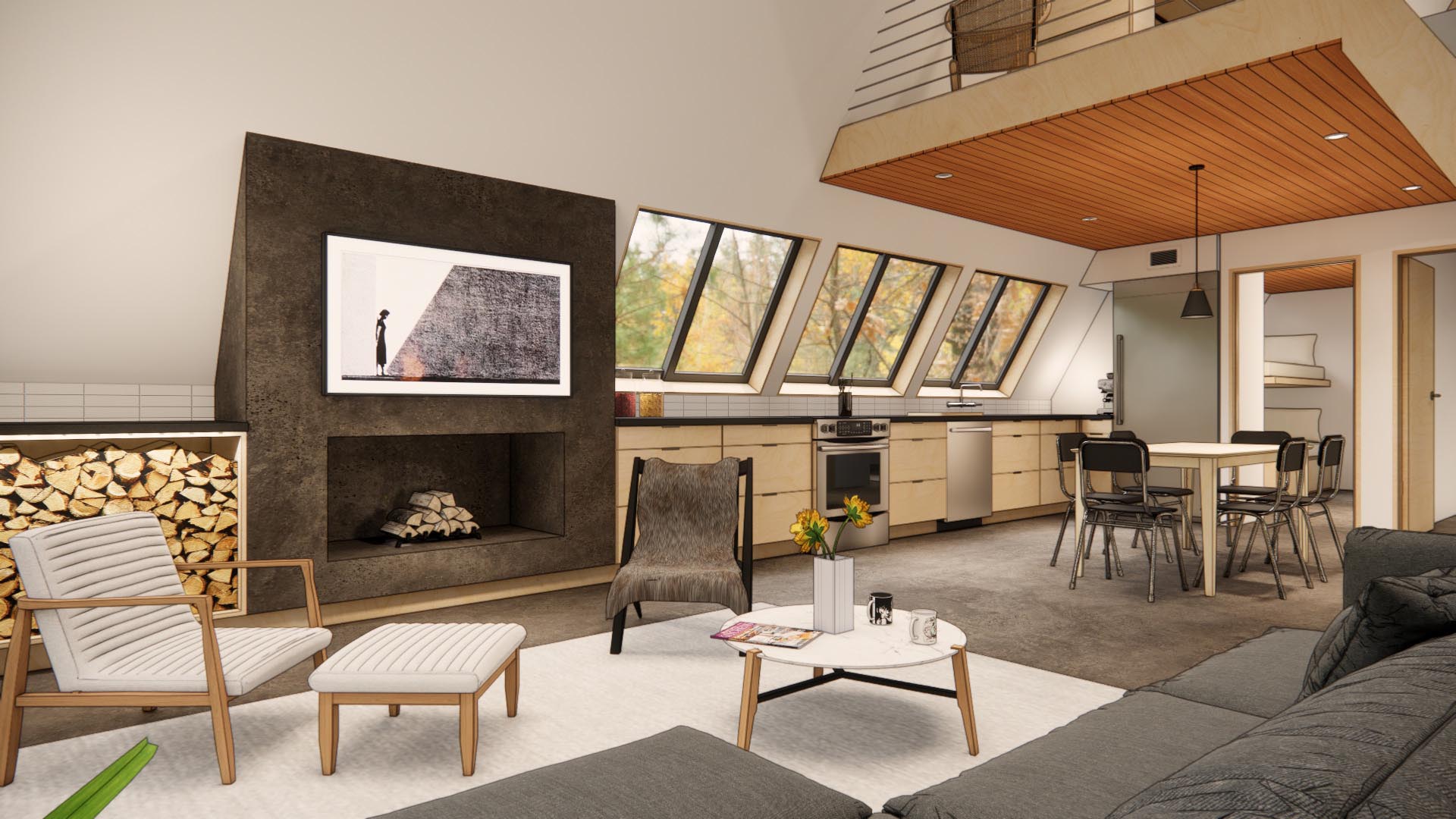
Enscape™ stands as a premier real-time rendering and virtual reality plugin, seamlessly integrating with Autodesk® Revit®, as well as other leading design software like Rhino, SketchUp, Archicad, and Vectorworks. Its unique position as a direct plugin offers an unparalleled, integrated workflow from initial design to final visualization across all project phases. This tool is designed for intuitive use, requiring no specialized rendering expertise, thereby empowering designers to visualize their creations as immersive 3D experiences with remarkable ease and speed.
The plugin has garnered widespread adoption among globally recognized architecture firms, including industry leaders like Foster + Partners and Kohn Pedersen Fox (KPF), demonstrating its capacity to elevate design presentations and client engagement. By enabling simultaneous design, documentation, and visualization, Enscape significantly streamlines the creative process.
Key Features for Enhanced Visualization
Enscape offers a robust suite of features designed to bring architectural models to life:
- Real-time Walk-through: Navigate and explore fully rendered 3D environments from any angle, providing an immersive understanding of the design.
- Synchronized Views: Utilize Enscape as a dynamic, rendered viewport directly within Revit, ensuring design and visualization stay perfectly aligned.
- Virtual Reality (VR) Support: Experience designs firsthand with one-click integration for Oculus Rift, HTC Vive, and Windows Mixed Reality headsets.
- Site Context Integration: Enhance renderings by importing real-world context using OpenStreetMap data, grounding designs in their physical surroundings.
- Orthographic Views: Create detailed two-dimensional views and axonometric perspectives using parallel projection, ideal for illustrating proportions.
- BIM Data Display: Access and display all relevant Building Information Modeling (BIM) data directly within the Enscape window for comprehensive project understanding.
- Collaborative Annotation: Streamline feedback loops by capturing and communicating comments with team members and stakeholders directly within the visualization.
- Architectural Rendering Styles: Adapt the visual presentation to suit the design stage, with options like White Mode, Sketch Mode, and Heat Map to aid client comprehension.
- Adjustable Views: Independently modify sun position and camera parameters for each view, allowing for dynamic exploration of lighting conditions.
- Material and Asset Libraries: Enhance scenes with over 390 predefined materials and 3500+ assets. Further customize these with the Material Editor, including height maps and texture adjustments for heightened realism. The “Replace with Enscape Material” function simplifies material application.
- Adjustable Assets: Refine scenes by selecting specific asset variants or customizing their colors and materials.
- Custom Asset Library: Import personal models and organize them into custom categories for easy access.
- Multi-Asset Placement and Editing: Efficiently select, place, and modify multiple assets simultaneously.
- Video Textures: Incorporate dynamic, animated surfaces into your designs for added realism.
- NVIDIA DLSS Support: Leverage Deep Learning Super Sampling technology to significantly improve performance during real-time walkthroughs.
- Video Path Creation: Explore and define multiple options for each keyframe in animated walkthroughs.
- Batch Panorama and Panorama Tour: Render multiple panoramas efficiently and navigate seamlessly through connected 360° panorama views.
- Export Options: Share work as fully rendered executable (.exe) files or web standalones. Utilize Alpha Channel Export for transparent backgrounds and QR codes for easy project exploration.
Core Use Cases and Trial Information
Enscape is instrumental for various stages of the design process, including design review, internal presentations, client presentations, and rapid rendering creation.
For those eager to explore its capabilities, Enscape offers a 14-day free trial. This trial period allows users to experience the full range of features before committing to a purchase. Licensing options include monthly or yearly subscriptions, available through the Enscape store. By registering for a trial, users agree to receive promotional communications. Further details on pricing and trial registration can be found at https://enscape3d.com/pricing/. For the latest updates and features, visit https://enscape3d.com/latest-version/ and https://enscape3d.com/features/.
The software utilizes a custom installer. For comprehensive guidance and support, users can refer to the help documentation available at https://apps.autodesk.com/RVT/en/Detail/HelpDoc?appId=2629595860167800202&appLang=en&os=Win64.
Enscape streamlines the visualization pipeline, making it an indispensable tool for modern architectural and design workflows. Its ease of use, coupled with powerful rendering capabilities, ensures that designs are not only created but also experienced with clarity and impact.