
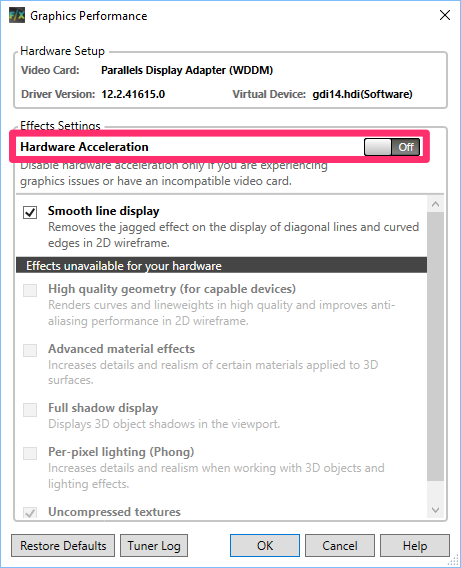
AutoCAD 2014 products, including AutoCAD LT 2014, do not natively recognize GRID passthrough or vGPU as certified graphics devices when used with Windows Server and XenApp. This limitation results in the disabling of all hardware-accelerated features, forcing the application to rely on software rendering for its effects. This fallback can significantly degrade the user experience, particularly in environments aiming for high concurrent user (CCU) ratios. It’s important to note that these workarounds do not apply to AutoCAD 2015, which utilizes a new graphics detection API that supports GRID passthrough.
While a simpler method involves deleting the AdskHwCertificationDatabase.xml file located in Public\Documents\AutoDesk\AutoCAD 2014\R20\PTXML\, this approach has proven ineffective in some scenarios, such as on a 2008R2 XenApp 6.5 host. Therefore, a more robust solution is to modify the Windows Registry to manually enable hardware acceleration features in AutoCAD 2014. This registry tweak overrides the limitations imposed by the PTXML file. Users should proceed with caution, as Autodesk does not officially support these modifications. It is recommended to utilize these tweaks for testing and evaluation purposes rather than for critical XenApp deployments.
Manual Hardware Acceleration Enablement via Registry
To manually enable hardware acceleration and other features, we will focus on the registry value located at HKEY_CURRENT_USER\Software\Autodesk\AutoCAD LT\R20\ACADLT-D001:409\3DGS Configuration\FeatureData. The specific path within the registry may vary depending on your AutoCAD product version (e.g., \AutoCAD\Rxx.x\ACADxx…:409\).
The FeatureData value is a binary entry structured into three integers, representing features that are available, enabled, and recommended. For instance, an example structure 7f 02 00 00 5b 02 00 00 7f 02 00 00 can be interpreted as the numbers 27F (639), 25B (603), and 27F (639) when read in little-endian format. These numbers become clearer when viewed in their binary representation. For example, 603 in binary is 1001011011.
The bits, read from right to left, correspond to specific features:
| Bit | Integer Value | Name | Comments |
|---|---|---|---|
| 0 | 1 | Hardware Acceleration | |
| 1 | 2 | Geometry Acceleration | |
| 2 | 4 | Anti-aliasing | |
| 3 | 8 | Gooch | |
| 4 | 16 | Shadows | |
| 5 | 32 | Texture Compression | |
| 6 | 64 | Phong | |
| 7 | 128 | 2D Hardware Acceleration | Deprecated |
| 8 | 256 | Disable 2D Pre-clip | Deprecated |
| 9 | 512 | Advanced Materials |
In essence, hardware acceleration is enabled when the corresponding bit is set to 1 (odd integer value) and disabled when it’s 0 (even integer value).
Optimizing FeatureData for Performance
For practical application, focusing on the middle integer value of the FeatureData is key, as it controls the enabled settings. Deprecated features should be disabled. Given that modern GPUs typically have ample memory, disabling texture compression can save processing cycles. The most impactful feature for both performance and visual fidelity is Anti-aliasing.
Here are two sets of FeatureData values that maintain other settings while toggling Anti-aliasing on and off:
- Anti-aliasing OFF; all other HW features ON (except texture compression):
7f 02 00 00 5b 02 00 00 7f 02 00 00 - Anti-aliasing ON; all other HW features ON (except texture compression):
7f 02 00 00 5f 02 00 00 7f 02 00 00
Testing indicates that enabling Anti-aliasing can double the GPU compute load, as observed with nvidia-smi on a XenApp host. If maximizing user density is a priority and visual aliasing is acceptable, disabling Anti-aliasing is recommended. For instance, with Anti-aliasing enabled, simply manipulating the 3D triad cursor can incur approximately 45% GPU utilization on a K2 passthrough. Conversely, with Anti-aliasing disabled, the same action might only require around 20% GPU utilization.
Exploring advanced AutoCAD functionalities can further enhance your workflow. For a basic understanding of 3D in AutoCAD, a autocad 3d basic tutorial can be invaluable. If you need to transition designs, understanding how to perform an autocad 3d to sketchup conversion is crucial. For those considering subscription options, reading autodesk autocad 1 year subscription reviews can provide useful insights. Furthermore, mastering tools like autocad smart dimension can significantly streamline the dimensioning process. Lastly, for users curious about the capabilities of the LT version, investigating can autocad lt do 3d will clarify its 3D modeling potential.
We hope these insights assist you with your GRID testing and AutoCAD on XenApp deployments. Please share any issues or feedback.